
What are the best document processing tools in 2026? The top tools are Google Document AI (best OCR accuracy), AWS Textract (best for AWS ecosystems), Azure AI Document Intelligence (best for Microsoft ecosystems), Rossum (best for invoice processing), Hyperscience (best enterprise platform), ABBYY Vantage (best on-premise option), Nanonets (best no-code), and custom pipelines for regulated or proprietary document types.
This is not a rewrite of each vendor’s marketing page. We’ve deployed several of these tools in production systems and built custom alternatives when off-the-shelf didn’t fit. Every assessment includes what the tool actually does well and where it falls short.
The honest truth: for 70% of document processing needs, an off-the-shelf tool is the right answer. Custom pipelines only make sense when you have unusual requirements that the platforms genuinely cannot handle.
Start with the comparison table to narrow your shortlist, then read the detailed reviews for the tools that fit your situation. The custom vs. off-the-shelf section at the end will help you decide if you even need a platform at all.
Our Experience With Document AI
We’ve built custom document processing systems including a Document AI pipeline for financial services that processes loan applications, compliance documents, and KYC paperwork. That project required on-premise deployment, human-in-the-loop verification for low-confidence extractions, and audit trails for every decision.
In the process, we evaluated most of the tools on this list. Some we integrated into our pipeline. Some we rejected for specific reasons. Some we recommend to clients when a custom build isn’t justified.
The honest truth: for 70% of document processing needs, an off-the-shelf tool is the right answer. Custom pipelines only make sense when you have unusual requirements that the platforms genuinely cannot handle.
The Tools
1. Google Document AI
What it is: Google’s cloud-based document processing service, part of Google Cloud Platform. It combines OCR with machine learning to extract structured data from documents. Supports specialised processors for invoices, receipts, identity documents, lending documents, and custom document types via a trainable processor.
Best for: Organisations already on Google Cloud that need high-volume OCR with decent out-of-the-box accuracy. The pre-built processors for invoices and receipts work well for standard formats. Google’s OCR engine is arguably the best in class for raw text extraction accuracy, particularly on poor-quality scans and handwriting.
Limitations: The custom processor training requires significant labelled data (200+ documents minimum for reasonable accuracy). The API can be slow for complex documents — we’ve seen 8–15 second processing times for multi-page PDFs. Pricing becomes expensive at scale: the per-page cost seems low until you’re processing 100K+ pages monthly. No on-premise deployment option.
Pricing: Pay-per-page. Roughly $0.01–$0.065 per page depending on processor type. First 1,000 pages/month free for most processors.
Our take: The best raw OCR engine available. If your primary need is getting text off pages with high accuracy, Google Document AI is hard to beat. Where it struggles is understanding context — it extracts fields, but connecting extracted data to business logic still requires custom code.
2. AWS Textract
What it is: Amazon’s document extraction service within AWS. Goes beyond basic OCR to identify tables, forms, key-value pairs, and signatures. Includes specialised APIs for identity documents (AnalyzeID), expense receipts (AnalyzeExpense), and lending documents (AnalyzeLending).
Best for: AWS-ecosystem businesses that need tight integration with S3, Lambda, and Step Functions. Textract’s table extraction is particularly strong — better than Google Document AI for complex multi-column tables with merged cells. The AnalyzeLending API is purpose-built for mortgage and loan document processing.
Limitations: Raw OCR accuracy is slightly behind Google’s, particularly on handwritten text and degraded scans. The custom queries feature (Textract Queries) helps with extraction accuracy but requires careful prompt engineering. No on-premise option. Regional availability varies — not all features are available in eu-west-2 (London).
Pricing: Pay-per-page, tiered by feature. Basic OCR from $0.0015/page, table/form extraction from $0.015/page, queries from $0.01 per query per page.
Our take: Pragmatic choice for AWS shops. The infrastructure integration is seamless — documents land in S3, trigger Lambda, process through Textract, results land in DynamoDB. But if you’re not already on AWS, it’s not worth switching cloud providers for.
3. Azure AI Document Intelligence
What it is: Microsoft’s document processing service (formerly Form Recognizer), part of Azure AI Services. Offers pre-built models for invoices, receipts, identity documents, tax forms, and health insurance cards. Includes a custom model builder with a visual labelling tool in the Azure AI Studio.
Best for: Microsoft-ecosystem businesses. The integration with Power Automate, Logic Apps, and Microsoft 365 is the strongest differentiator — you can build a complete document workflow from email ingestion to processed output without leaving the Microsoft stack. The custom model training UI is the most user-friendly of the three cloud providers.
Limitations: OCR accuracy on non-English documents lags behind Google. The “composed model” approach (routing documents to the right model) requires careful setup and can misclassify edge cases. Performance can be inconsistent — we’ve observed variance in extraction accuracy between the same document processed minutes apart. Docker container deployment exists for on-premise but is limited in features compared to cloud.
Pricing: Pay-per-page. Read model from $0.001/page, pre-built models from $0.01/page, custom models from $0.025/page.
Our take: If your organisation runs on Microsoft 365 and Azure, this is the path of least resistance. The Power Automate connectors mean a competent business analyst can build basic document workflows without developer involvement. For standalone document extraction quality, it’s third behind Google and AWS.
4. Rossum
What it is: A Czech-founded, now London-headquartered AI platform specifically designed for transactional document processing — invoices, purchase orders, delivery notes, and similar financial documents. Uses a proprietary AI model that learns from corrections, improving accuracy over time for your specific document types.
Best for: Finance and accounts payable teams processing high volumes of invoices from many different suppliers. Rossum’s core strength is handling the “long tail” — the hundreds of different invoice formats from different vendors that break template-based systems. The built-in validation UI and human-in-the-loop workflow are production-ready out of the box.
Limitations: Narrowly focused. If you need to process anything beyond transactional documents — contracts, reports, technical drawings — Rossum isn’t designed for it. Pricing is premium for what it does. The learning curve for the admin configuration is steeper than it appears. Limited deployment options — cloud-only.
Pricing: Subscription-based, not publicly listed. Expect £1,000–£5,000+/month depending on volume. Contact for quote.
Our take: The best dedicated invoice processing platform we’ve used. If invoices are your primary use case and you process 500+ per month from varied suppliers, Rossum will outperform the cloud APIs because it’s purpose-built for exactly this problem. For anything else, look elsewhere.
5. Hyperscience
What it is: An enterprise intelligent document processing (IDP) platform based in New York with global operations. Hyperscience handles the full document lifecycle: classification, extraction, validation, and integration. It’s designed for large organisations processing millions of documents across many different types.
Best for: Enterprise organisations with complex, varied document portfolios — insurance claims processing, government applications, healthcare records. Hyperscience’s machine learning models handle document classification (routing the right document to the right extraction model) better than most competitors. The platform also supports semi-structured and unstructured documents, not just forms.
Limitations: Enterprise pricing means this is out of reach for mid-size businesses. Implementation timelines are measured in months, not days. The platform’s power creates complexity — you need dedicated staff to configure, train, and maintain it. Overkill for organisations processing fewer than 10,000 documents per month.
Pricing: Enterprise subscription. Not publicly listed. Expect six-figure annual commitments for meaningful deployments.
Our take: If you’re a large insurer, government department, or financial institution processing millions of varied documents, Hyperscience is worth evaluating. For everyone else, the cloud APIs or Rossum will serve you at a fraction of the cost and complexity.
6. ABBYY Vantage
What it is: ABBYY has been in the document recognition space for over 30 years. Vantage is their current-generation intelligent document processing platform, offering pre-trained “skills” for common document types and a marketplace where users share trained models. Available as cloud or on-premise deployment.
Best for: Organisations already using ABBYY products (FlexiCapture, FineReader) that want to modernise. The migration path from FlexiCapture to Vantage is well-defined. Also strong for organisations that need on-premise deployment — ABBYY’s on-premise option is more mature and feature-complete than the cloud providers’ container offerings.
Limitations: The skill marketplace is useful in theory but inconsistent in quality. Some skills work excellently; others need significant retraining. The UI feels dated compared to newer platforms like Rossum. ABBYY’s pricing structure is complicated — per-page, per-skill, per-deployment type — making cost prediction difficult before committing.
Pricing: Consumption-based with annual commitments. Varies significantly by deployment and skill selection. Request a detailed quote with your specific document volumes.
Our take: ABBYY’s OCR engine is battle-tested and reliable. If on-premise deployment is a hard requirement and you need a commercial platform (not a custom build), ABBYY Vantage is the strongest option. If you’re starting fresh with no legacy ABBYY investment, the cloud APIs offer better developer experience.
7. Nanonets
What it is: A no-code/low-code intelligent document processing platform based in San Francisco. Nanonets emphasises ease of setup — you can upload sample documents, label fields, train a model, and deploy an extraction pipeline in hours rather than weeks. Integrates with popular tools like Zapier, QuickBooks, and Xero.
Best for: Small to mid-size teams that want document automation without developer involvement. Accounts payable teams, operations managers, or finance professionals who need to extract data from invoices, purchase orders, or bank statements and push it into their existing tools. The Zapier and direct accounting software integrations make it genuinely no-code for standard workflows.
Limitations: Accuracy on complex or unusual document types falls short of the cloud APIs and enterprise platforms. The no-code approach means limited customisation — if your extraction logic has conditional rules or requires cross-referencing between documents, you’ll hit walls. Not suitable for high-security or regulated environments where you need full control over data processing.
Pricing: Free tier for up to 500 pages/month. Pro plans from $499/month. Enterprise pricing on request.
Our take: The best entry point for teams dipping their toes into document automation. If you’re processing a few hundred invoices monthly and want to stop manual data entry, Nanonets will solve that problem in a day. If you need enterprise-grade accuracy, compliance controls, or complex logic, you’ll outgrow it.
8. Custom Pipeline (What We Build)
What it is: A bespoke document processing system built from open-source and commercial components, tailored to your specific document types, extraction rules, and deployment requirements. Typically combines a foundation OCR engine (often Google Document AI or Tesseract) with custom ML models for classification and extraction, business logic layers, human-in-the-loop interfaces, and integration APIs.
Best for:
- Regulated industries where data cannot leave your infrastructure and you need full audit trails of every processing decision
- Proprietary document formats that no off-the-shelf tool handles well — internal engineering drawings, legacy forms, handwritten field notes
- Complex extraction logic where the meaning of a field depends on context from other parts of the document or other documents entirely
- Integration-heavy environments where document processing is one step in a larger automated workflow
Not ideal for: Standard documents (invoices, receipts, ID cards) at normal volumes. If Google Document AI or Rossum can handle your use case, building custom is a waste of budget and time. We tell clients this regularly.
Pricing: £15K–£80K depending on complexity, document types, and integration requirements. Ongoing maintenance typically 15–20% of build cost annually.
We build custom document processing systems, so we have an obvious incentive to recommend them. That’s why we lead every engagement by evaluating whether off-the-shelf tools can solve the problem first. In roughly 6 out of 10 initial conversations, we recommend an existing platform instead of a custom build.
Not sure which approach fits your documents?
We’ll evaluate your document types and tell you honestly whether off-the-shelf or custom is the right path. No commitment required.
Book a Free Consultation →Comparison Table
To see how a custom pipeline performs in practice, read our Document AI case study — it includes scope details that map to the custom pipeline row above.
When You Need Custom vs. When Off-the-Shelf Works
This is the most important decision you’ll make, and it has nothing to do with which specific tool you choose.
Off-the-Shelf Works When:
- Your documents are standard formats. Invoices, receipts, purchase orders, tax forms, identity documents. Every platform on this list handles these well because they’ve trained on millions of examples.
- Cloud processing is acceptable. Your data can leave your infrastructure, and you don’t need on-premise deployment for regulatory reasons.
- Volume is moderate. Under 10,000 documents per day. At this scale, cloud APIs are cost-effective and the per-page pricing model works in your favour.
- Extraction rules are straightforward. You need specific fields pulled from specific locations. “Get the total amount from this invoice” is a solved problem.
- You have standard downstream systems. The extracted data goes into QuickBooks, Xero, Salesforce, or a standard ERP. Most platforms have pre-built connectors.
Custom Makes Sense When:
- Your document formats are proprietary. Internal engineering specifications, legacy paper forms unique to your organisation, handwritten field reports. No pre-trained model has seen these documents.
- Regulation requires on-premise processing. Financial services under FCA supervision, healthcare under NHS DTAC, or any environment where sending documents to a third-party cloud API is a non-starter.
- Extraction requires context. The meaning of a field depends on other fields in the document, on data from other documents, or on business rules that change based on the document source. “If this is a German supplier, the tax field means X; if UK, it means Y” is the kind of logic that breaks off-the-shelf tools.
- You need a complete audit trail. Not just “what was extracted” but “why this extraction was chosen, what confidence level it had, who reviewed it, and when.” This level of traceability requires custom human-in-the-loop interfaces.
- Volume justifies the investment. Processing 50,000+ documents daily makes the economics of a custom build favourable compared to per-page API pricing.
Take 20 representative documents from your workflow. Upload them to Google Document AI’s free tier. If the extraction accuracy is above 90% for the fields you need, start there. You can always build custom later for the edge cases — and now you’ll know exactly which edge cases matter.
Integration Considerations
Choosing a document processing tool is only half the problem. Connecting it to your existing systems is where most projects stall.
API Quality Varies Significantly
The three cloud providers (Google, AWS, Azure) have excellent, well-documented APIs with SDKs in every major language. Rossum and Nanonets offer decent REST APIs. Hyperscience and ABBYY’s APIs are functional but designed for enterprise integration patterns — expect more setup work and less developer-friendly documentation.
Human-in-the-Loop Is Essential
No document processing tool achieves 100% accuracy. Every production deployment needs a mechanism for human review of low-confidence extractions. Some platforms (Rossum, Hyperscience) include built-in review interfaces. The cloud APIs don’t — you’ll need to build your own review UI or integrate with a workflow tool.
Plan for this from the start. The most common failure mode we see in document automation projects is launching without a human review process and discovering three months later that 8% of extractions were wrong and nobody caught them.
Think About the Full Workflow
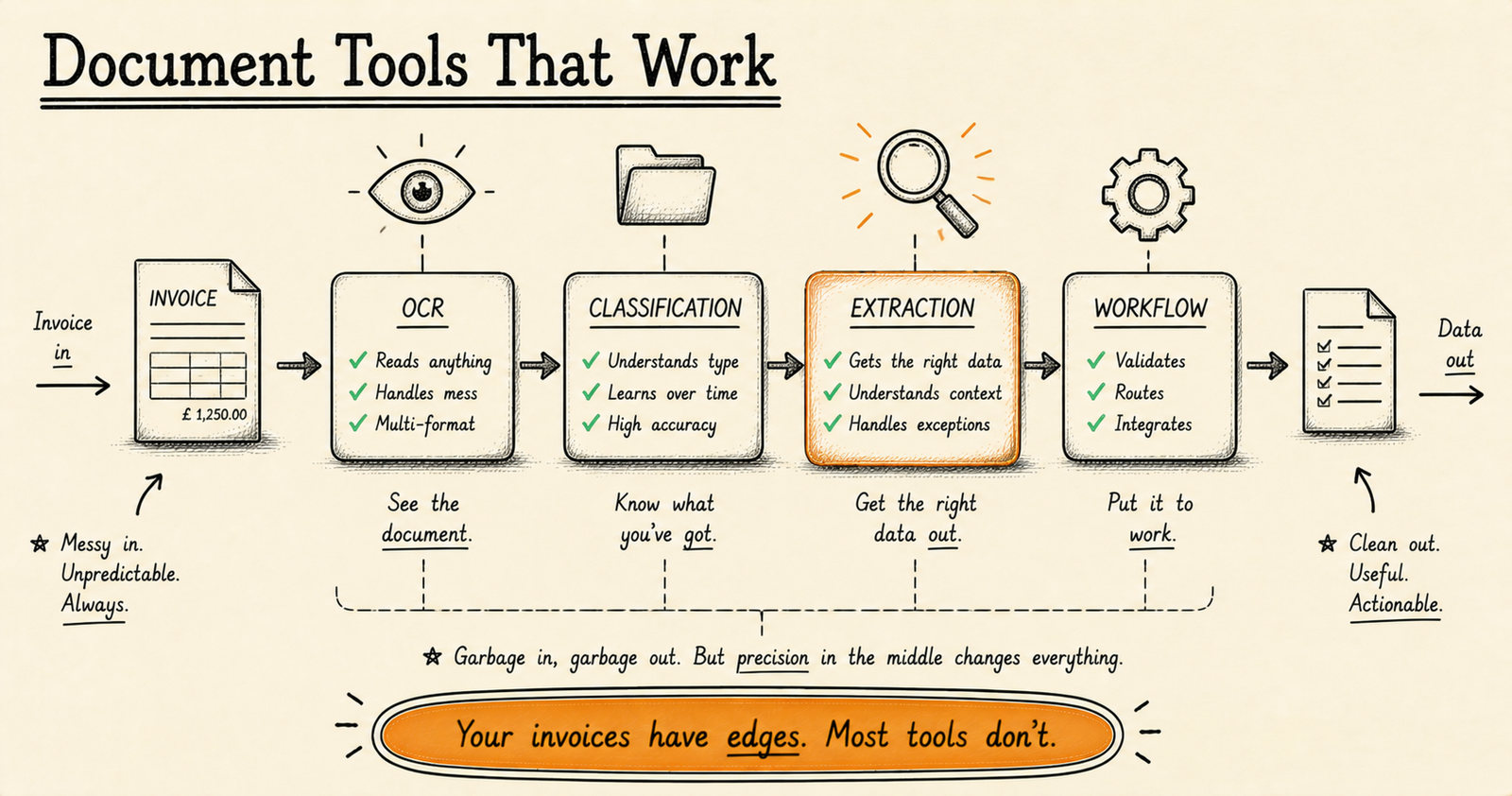
Document processing rarely exists in isolation. The extracted data needs to go somewhere — an ERP, a database, an approval workflow. Map the complete journey before choosing a tool:
- How do documents arrive? (Email, upload, scan, API)
- What classification is needed? (Is this an invoice or a credit note?)
- What extraction is needed? (Which specific fields?)
- What validation is needed? (Does the total match the line items?)
- What happens when confidence is low? (Human review queue)
- Where does the extracted data go? (ERP, database, downstream API)
- What audit trail is required? (Regulatory, internal, none)
The answers to these questions will narrow your tool choice more effectively than any feature comparison table.
For more on document processing costs, read our guide on what custom AI systems actually cost in 2026. For a broader evaluation framework, see the Buyer’s Guide to Custom Software.
For 70% of use cases, an off-the-shelf tool is the right answer. For the other 30%, custom pipelines deliver what platforms cannot.
Start with Google Document AI’s free tier to test your documents. If accuracy is above 90%, stay with a cloud API. If you need on-premise, audit trails, or proprietary document handling — that’s when custom makes economic sense.
Recommended Reading
What are the best document processing tools in 2026?
The top tools are Google Document AI (best OCR accuracy), AWS Textract (best for AWS ecosystems and table extraction), Rossum (best for invoices), and ABBYY Vantage (best on-premise). For no-code needs, Nanonets is the easiest starting point. See our full comparison table.
When should I build custom instead of using off-the-shelf?
Custom pipelines make sense when regulation requires on-premise processing, your documents are proprietary formats, extraction requires contextual understanding, or you process 50,000+ documents daily. For standard invoices and receipts, off-the-shelf is almost always better.
How much do document processing tools cost?
Cloud APIs cost $0.001–$0.065 per page. Dedicated platforms like Rossum run £1K–£5K+/month. Enterprise platforms require six-figure annual commitments. Custom builds cost £15K–£80K plus 15–20% annually for maintenance. Read our AI cost guide for context.
Which tool has the best OCR accuracy?
Google Document AI has the best raw OCR accuracy, especially on poor-quality scans and handwriting. AWS Textract is better for complex table extraction. For invoice-specific processing, Rossum achieves the highest accuracy because it is purpose-built for transactional documents.
Do I need human review for document processing?
Yes. No tool achieves 100% accuracy. Every production deployment needs a mechanism for human review of low-confidence extractions. Some platforms (Rossum, Hyperscience) include built-in review interfaces. Cloud APIs require you to build your own.