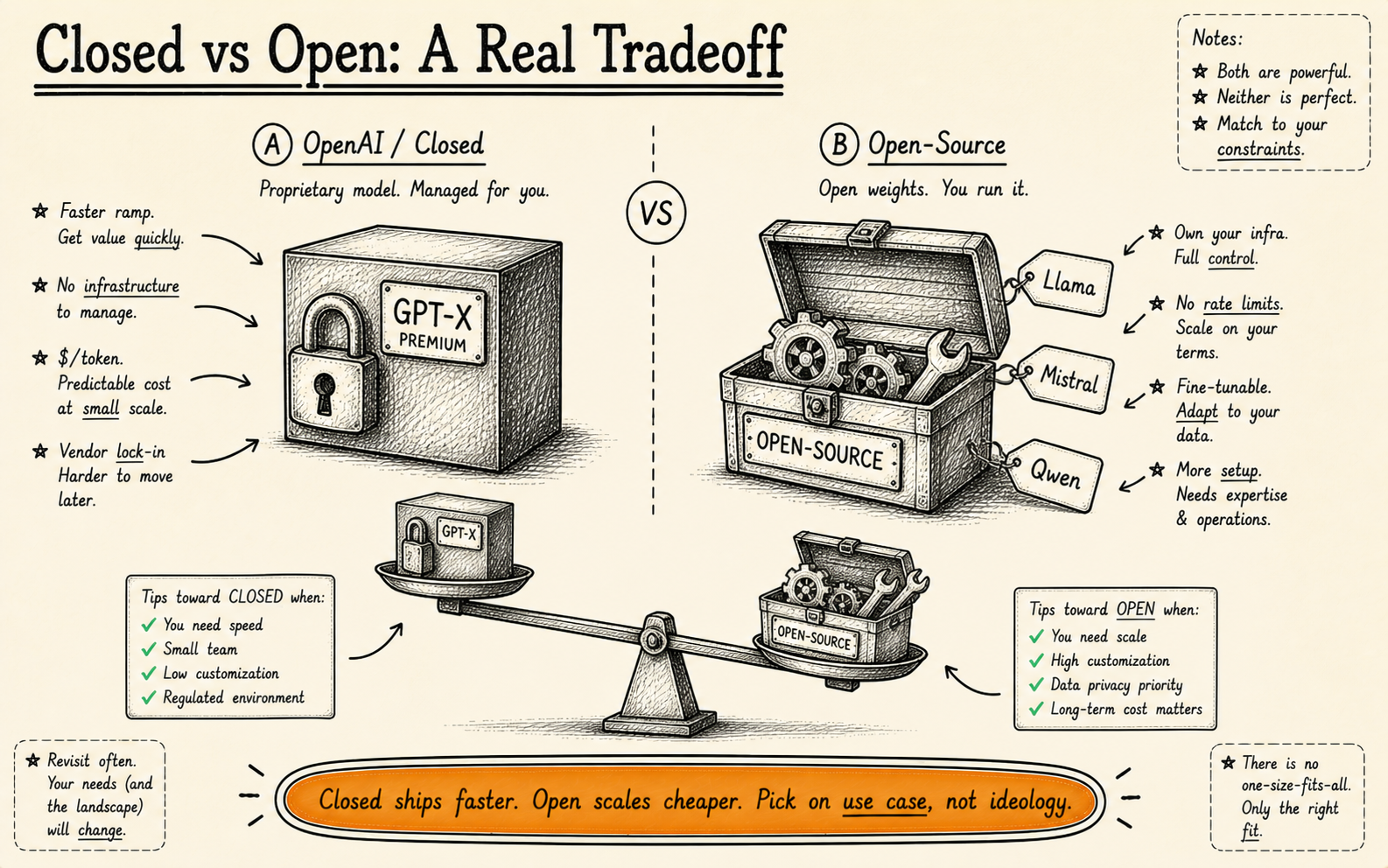
Should you use OpenAI GPT-4 or open-source models for business? For most applications, OpenAI’s GPT-4o offers the best quality-to-effort ratio. For data-sensitive applications, on-premise requirements, or high-volume use cases, open-source models like Llama 3, Mistral, and Qwen are increasingly viable. This guide helps you choose based on your actual requirements — not hype.
Our Position
We work with both. About 60% of our production deployments use OpenAI models. The other 40% use open-source. The split isn’t ideological — it’s practical.
We don’t have a partnership with OpenAI. We don’t get referral fees from any model provider. The choice depends entirely on the client’s requirements: their data sensitivity, volume, budget, in-house expertise, and regulatory environment.
This article gives you the honest picture we share with clients when they ask us the same question you’re probably asking: “Which AI model should we use?”
OpenAI (GPT-4o, GPT-4 Turbo) — Honest Review
Strengths
Best general reasoning available. GPT-4o remains the benchmark for complex reasoning, nuanced language understanding, and multi-step problem solving. In head-to-head evaluations across our client projects, it consistently outperforms open-source alternatives on tasks requiring judgment, ambiguity handling, and creative problem solving.
Massive context windows. GPT-4o supports 128K token context windows. GPT-4 Turbo matches this. For applications that need to process long documents, multi-turn conversations, or large datasets in a single pass, this is a significant advantage — most open-source models cap at 8K–32K tokens without modification.
Excellent API and developer experience. OpenAI’s API is well-documented, reliable, and fast. Function calling, JSON mode, vision capabilities, and streaming are all polished. Time-to-first-prototype is measured in hours, not days.
Continuous improvement. OpenAI ships model improvements regularly. You get better performance over time without doing anything — your API calls simply return better results as models improve. With open-source, you upgrade manually.
Weaknesses
Data privacy is the elephant in the room. Every API call sends your data to OpenAI’s servers. Their data usage policy has improved — they no longer train on API data by default — but the data still transits and is temporarily processed on their infrastructure. For healthcare, legal, financial, and government applications, this is often a non-starter.
Cost at scale is punishing. GPT-4o pricing sits at approximately $2.50 per 1M input tokens and $10.00 per 1M output tokens. For a prototype handling 100 requests a day, that’s negligible. For a production system handling 100,000 requests a day with average 1,000-token responses, you’re looking at roughly $30–$50 per day in API costs — $900–$1,500/month — and that scales linearly. A self-hosted open-source model on a dedicated GPU can handle the same volume for a flat $300–$600/month in infrastructure.
Vendor lock-in is real. If you build your entire product around OpenAI’s function calling format, their specific prompt engineering patterns, and their API structure, switching to an alternative takes significant refactoring. We’ve done these migrations — they typically take 2–4 weeks of engineering time.
Fine-tuning has limits. You can fine-tune GPT-4o Mini and GPT-3.5 Turbo, but not the full GPT-4o model. If you need a model deeply adapted to your domain’s language and patterns, you’re limited to smaller variants or prompt engineering — which may not be enough for specialised tasks.
Pricing (Approximate, March 2026)
- GPT-4o: $2.50/1M input tokens, $10.00/1M output tokens
- GPT-4o Mini: $0.15/1M input tokens, $0.60/1M output tokens
- GPT-4 Turbo: $10.00/1M input tokens, $30.00/1M output tokens
- Fine-tuning (GPT-4o Mini): $3.00/1M training tokens + higher inference costs
Rapid prototyping and MVPs. General-purpose AI features (chatbots, content generation, summarisation). Businesses without strict data sovereignty requirements. Teams without ML infrastructure expertise. Applications where quality matters more than cost.
Open-Source Models — Honest Review
The open-source AI landscape has changed dramatically. Models that would have been science fiction two years ago are now free to download and deploy. Here are the ones that matter for business applications:
Llama 3.1 (Meta) — The Default Open-Source Choice
Meta’s Llama 3.1 comes in 8B, 70B, and 405B parameter variants. The 70B model is the sweet spot for most business applications — it delivers roughly 85–90% of GPT-4o’s quality on standard benchmarks while being fully self-hostable. The 405B model narrows the gap further but requires serious GPU infrastructure (4–8 A100 GPUs).
Best for: General-purpose business AI where data must stay on your infrastructure. The most versatile open-source option available — strong at conversation, reasoning, code generation, and analysis. The community and tooling ecosystem around Llama is the largest of any open-source model family.
Mistral / Mixtral (Mistral AI) — The Efficiency Leader
Mistral’s models punch above their weight. Mixtral 8x22B uses a mixture-of-experts architecture that delivers performance close to much larger models while using a fraction of the compute at inference time. Mistral Large competes directly with GPT-4o on many benchmarks. Their models also have a strong track record for multilingual tasks — particularly European languages.
Best for: Cost-optimised inference at scale. Multilingual applications, especially European languages. Businesses that want strong performance without massive GPU requirements. Mixtral 8x22B can run on 2 A100 GPUs while delivering 70B-class performance.
Qwen 2.5 (Alibaba) — The Dark Horse
Qwen 2.5 doesn’t get the attention of Llama or Mistral in the Western market, but it’s exceptional. The 72B variant matches or exceeds Llama 3.1 70B on many benchmarks, with particularly strong performance on coding, mathematics, and structured reasoning tasks. It also supports 128K context windows natively.
Best for: Code generation and analysis tasks. Mathematical and logical reasoning applications. Businesses that need long-context processing with open-source models. Teams comfortable working with a model that has less English-language community support.
Gemma 2 (Google) — The Lightweight Contender
Google’s Gemma 2 comes in 2B, 9B, and 27B variants. The 27B model delivers impressive quality relative to its size — suitable for many production tasks while running on a single consumer-grade GPU. The smaller variants are ideal for edge deployment and latency-sensitive applications.
Best for: Applications where hardware budget is limited. Edge deployment (on-device AI). Latency-sensitive use cases where you need fast responses. The 9B model is a good choice for focused tasks like classification, extraction, and simple generation where you don’t need the reasoning depth of a 70B model.
Open-Source Strengths (Across All Models)
- Full data control. Your data never leaves your infrastructure. For regulated industries, this is often the deciding factor — there’s no third-party data processor to audit, no data transit to encrypt, no vendor privacy policy to evaluate.
- No per-token costs. You pay for infrastructure (GPU servers), not usage. At high volume, this is dramatically cheaper. A dedicated A100 GPU costs $1.50–$3.00/hour and can handle thousands of inference requests per hour.
- Full fine-tuning capability. You can fine-tune any open-source model on your domain data using techniques like LoRA or QLoRA. A fine-tuned 8B model on your specific task can outperform a general-purpose GPT-4o for that task — at a fraction of the cost.
- No vendor dependency. If Meta stops supporting Llama, the model weights still exist. Your deployment doesn’t disappear overnight. You can also switch between open-source models without the vendor lock-in issues of proprietary APIs.
Open-Source Weaknesses (The Honest Part)
- You need ML infrastructure expertise. Deploying, scaling, and maintaining a self-hosted model is non-trivial. You need someone who understands GPU provisioning, model serving frameworks (vLLM, TGI), quantisation, and monitoring. If your team doesn’t have this, you’ll either hire for it or outsource it.
- Quality gaps persist for complex reasoning. On simple tasks — classification, extraction, summarisation — the gap between open-source and GPT-4o is negligible. On complex reasoning, multi-step planning, and nuanced judgment, GPT-4o still wins. The gap is narrowing every quarter, but it’s still there.
- Slower to deploy. An OpenAI integration takes hours. A self-hosted open-source deployment takes days to weeks, depending on infrastructure complexity. If time-to-market matters, this is a real cost.
- Maintenance is on you. Model updates, security patches, infrastructure scaling, uptime monitoring — it’s all your responsibility. OpenAI handles this for you. The ongoing operational cost of self-hosting is real and often underestimated.
Data-sensitive industries (healthcare, finance, legal, government). High-volume applications where per-token costs become prohibitive. On-premise or air-gapped environments. Applications requiring deep fine-tuning on domain-specific data. Businesses with in-house ML engineering capability.
Head-to-Head Comparison
| Factor | OpenAI (GPT-4o) | Open-Source (Llama 3.1 70B) |
|---|---|---|
| Quality (general reasoning) | Best in class | 85–90% of GPT-4o |
| Cost at 1K requests/day | ~$1–$3/day | ~$36–$72/day (GPU rental) |
| Cost at 100K requests/day | ~$30–$50/day | ~$36–$72/day (same GPU) |
| Data privacy | Data processed by OpenAI | Full control, on your infra |
| Fine-tuning | Limited (smaller models only) | Full fine-tuning on all models |
| Time to deploy | Hours | Days to weeks |
| Maintenance burden | None (managed by OpenAI) | Significant (your team) |
| Vendor lock-in risk | High | Low |
| Context window | 128K tokens | 8K–128K (model dependent) |
| Multimodal (vision, audio) | Native support | Limited (LLaVA, etc.) |
Notice how costs cross over at scale. At low volume, OpenAI is dramatically cheaper because you don’t pay for idle GPU time. At high volume, open-source is dramatically cheaper because GPU costs are fixed while OpenAI costs are linear. The typical crossover point is around 5,000–15,000 requests per day, depending on response length and model size.
Need Help Choosing the Right Model?
We’ll assess your requirements and recommend the approach that fits — proprietary, open-source, or hybrid.
Book a Free Consultation →The Hybrid Architecture We Recommend
For most production AI systems, the answer isn’t “OpenAI or open-source” — it’s both. Here’s the architecture pattern we deploy most often:
Route tasks requiring nuanced judgment, creative generation, or multi-step reasoning to GPT-4o. These are typically lower-volume, higher-value requests — a customer asking a complex question, an analyst needing a detailed summary, an edge case the simpler model can’t handle. Maybe 10–20% of total requests.
Route classification, extraction, simple generation, and template-based tasks to a self-hosted Llama 3.1 or Mistral model. These are typically high-volume, well-defined tasks where a fine-tuned open-source model matches or exceeds GPT-4o’s performance on the specific task. Maybe 70–80% of total requests.
Route intent detection, keyword extraction, and simple classification to a lightweight model like Gemma 2 9B or a fine-tuned Llama 3.1 8B. Sub-50ms latency, minimal compute cost. Maybe 10–15% of total requests.
A routing layer sits in front of all three tiers, analysing each incoming request and directing it to the appropriate model based on complexity, data sensitivity, and latency requirements. This isn’t theoretical — it’s how we build production systems for clients who need both quality and cost efficiency.
A hybrid architecture typically reduces total AI costs by 40–60% compared to routing everything through GPT-4o, while maintaining equivalent output quality because each tier is optimised for its task type.
What About Claude, Gemini, and Others?
The market isn’t just OpenAI versus open-source. Here are honest takes on the other major players:
Anthropic Claude (Claude 3.5 Sonnet, Claude 3 Opus)
Claude is genuinely excellent. Claude 3.5 Sonnet matches or exceeds GPT-4o on many benchmarks, particularly for long-form analysis, careful reasoning, and following complex instructions. Their emphasis on safety and alignment produces noticeably more careful, nuanced outputs. Pricing is competitive with OpenAI. The API is clean and well-designed.
The catch: Smaller ecosystem and fewer third-party integrations than OpenAI. The context window handling is different, and some complex function calling patterns that work smoothly with OpenAI require more prompt engineering with Claude. For new projects, we evaluate Claude alongside GPT-4o and let benchmark results on the client’s specific tasks decide.
Google Gemini (Gemini 1.5 Pro, Gemini 1.5 Flash)
Gemini 1.5 Pro’s standout feature is its 1M+ token context window — dramatically larger than any competitor. For applications that need to process entire codebases, lengthy legal documents, or large datasets in a single pass, Gemini is uniquely capable. Gemini Flash offers strong performance at lower cost for less demanding tasks.
The catch: Availability and consistency have been less reliable than OpenAI’s API in our experience. The model can also be inconsistent across different task types — excellent at some, mediocre at others within the same conversation. We use Gemini primarily for long-context applications where the 1M token window is a requirement, not a nice-to-have.
Cohere
Cohere is under-discussed but solid for enterprise search and RAG (Retrieval-Augmented Generation) applications. Their embedding models are excellent, and Cohere Command R is specifically designed for enterprise AI workflows with built-in grounding and citation capabilities.
The catch: It’s a narrower tool. Cohere excels at enterprise search and document AI but isn’t trying to be a general-purpose model like GPT-4o or Llama. If your use case is specifically search, knowledge management, or document analysis, evaluate Cohere seriously. For everything else, the other options above are better fits.
Any model comparison becomes partially outdated within 3–6 months. We re-evaluate model choices for active client projects quarterly. If you’re making a decision today, use this guide as a starting point — but test on your actual use case with your actual data before committing.
Making the Decision: A Framework
Instead of arguing about benchmarks, run your decision through these five questions:
1. Where does your data live, and where must it stay?
If your data can be sent to a third-party API — use OpenAI or Claude. Fastest to deploy, best quality, minimal infrastructure. If your data must stay on your infrastructure due to regulation, policy, or competitive sensitivity — use open-source models. Llama 3.1 70B or Mistral Large, self-hosted.
2. What’s your daily request volume?
Under 5,000 requests/day — proprietary APIs are almost certainly cheaper when you account for infrastructure and engineering costs. Over 15,000 requests/day — self-hosted open-source starts becoming significantly cheaper. Between 5,000 and 15,000 — it depends on response length, model size, and your infrastructure team’s capacity. Do the maths for your specific case.
3. How complex are your AI tasks?
Simple, well-defined tasks (classification, extraction, template generation) — open-source models work fine, especially when fine-tuned. A fine-tuned Llama 3.1 8B can outperform GPT-4o on a specific classification task. Complex, open-ended tasks (multi-step reasoning, creative generation, nuanced analysis) — GPT-4o or Claude still lead. The gap narrows with larger open-source models (70B+) but doesn’t disappear.
4. Do you have ML engineering in-house?
If you have ML engineers who can manage model deployment, monitoring, and fine-tuning — open-source is viable. If you don’t — start with proprietary APIs. Hiring or contracting ML infrastructure expertise for a self-hosted deployment adds £60K–$120K/year in costs. Factor that into your comparison.
5. How fast do you need to launch?
This week — OpenAI API. No contest. Time-to-prototype is hours. This month — either option is feasible with the right team. This quarter — consider open-source, especially if your long-term volume justifies the upfront investment.
Start with OpenAI or Claude for your prototype and initial deployment. Measure your actual usage patterns, costs, and quality requirements. If you hit the volume crossover, data privacy limits, or fine-tuning ceiling — migrate the appropriate tasks to self-hosted open-source models. This is the least risky, most capital-efficient path.
Start with OpenAI for speed. Migrate to open-source where the data or maths demands it.
The best production AI systems use both — routing complex reasoning to proprietary models and high-volume standard tasks to self-hosted open-source. The decision is practical, not ideological. Test on your actual use case, measure the costs, and let the data decide.
AI agents and tools: the full series
This article is part of our AI agents and tools series. The pillar guide covers the whole topic; the others each go deeper on one part.
- Pillar guideWhat is an AI agent?Start here: an agent perceives, decides and acts toward a goal, unlike a chatbot or a fixed automation.
- AI agent vs chatbotChatbots answer questions; agents decide and act inside your systems.
- AI agents vs Zapier, Make and n8nWhen you need an agent that decides versus a workflow that connects.
- AI workflow automation tools comparedEight tools compared on real total cost, and where each one breaks.
- AI stacks that reach productionFive stacks that ship, and how to match yours.
- Best no-code AI platformsWhat no-code AI platforms can and cannot do, and when you will outgrow them.
- Best document processing toolsAI document extraction tools compared, and how to pick one for your workflow.
- GPT-6 Astra: enabling it safelyWhat a regulated firm should settle before switching it on.
Recommended Reading
Is GPT-4o better than open-source models?
For complex reasoning, yes. For well-defined tasks like classification and extraction, a fine-tuned open-source model can match or beat GPT-4o at a fraction of the cost. The answer depends on your specific task, not a general benchmark.
How much does GPT-4o cost at scale?
At 100K requests/day with 1,000-token responses, roughly $900–$1,500/month. A self-hosted open-source model handles the same volume for $300–$600/month in GPU infrastructure. See the full cost breakdown.
Which open-source model should I use?
Llama 3.1 70B for general-purpose business AI. Mistral/Mixtral for multilingual and efficiency. Qwen 2.5 for code and maths. Gemma 2 for lightweight or edge deployment. Test on your actual task before committing.
What is a hybrid AI architecture?
A system that routes different AI tasks to different models. Complex reasoning goes to GPT-4o, standard tasks to self-hosted open-source, and simple tasks to lightweight models. This reduces costs 40–60% while maintaining quality. Read our custom vs off-the-shelf guide for more.
Can KORIX help deploy open-source models?
Yes. We deploy both OpenAI-based and self-hosted open-source systems. About 40% of our production deployments use open-source models. Book a call to discuss your requirements.
Building an AI system? Let’s talk architecture.
We’ll help you choose the right models, deployment strategy, and architecture for your specific requirements. No vendor bias — just engineering judgment.