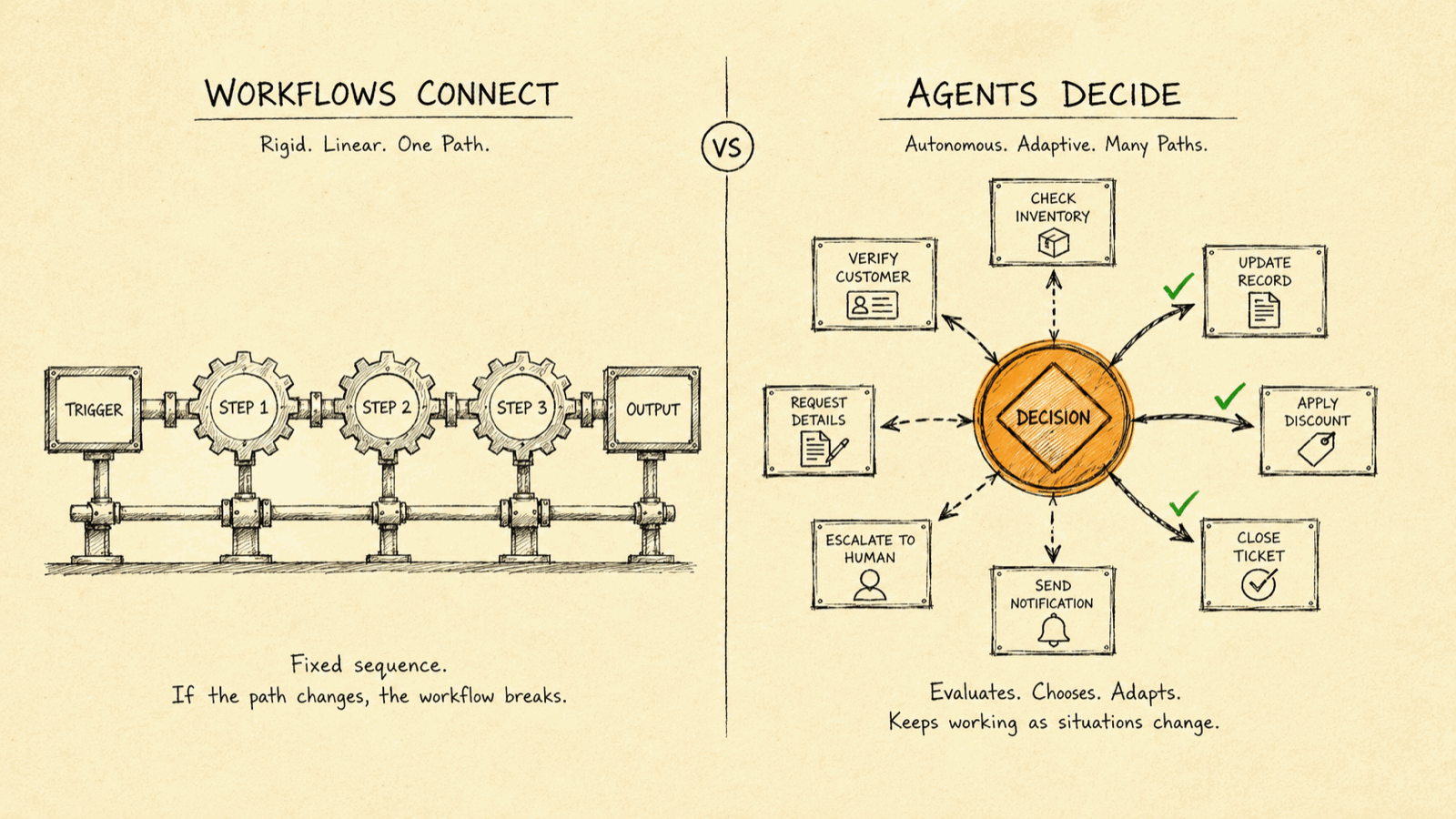
Use Zapier, Make or n8n when the task is a fixed set of rules: when X happens, do Y. Build an AI agent only when the work needs judgment under ambiguity: reading messy input, weighing options, and deciding what to do next. Workflows connect; agents decide. Most "we need AI" requests are really "we need automation," and paying agent prices for workflow problems is how budgets disappear.
Half the "AI agent" projects KORIX founder Shishir Mishra gets asked about don't need an agent at all; they need a Zapier zap and an afternoon. After nineteen years building software, the most common (and most expensive) confusion he sees is treating "automation" and "AI agent" as the same purchase. They aren't. One executes rules you already know; the other makes decisions you can't fully script. Buy the wrong one and you either overpay enormously for plumbing, or you try to force a rules engine to handle judgment it was never built for.
This guide draws the line clearly: what Zapier, Make and n8n actually do, what an AI agent actually does, an honest comparison of cost and fit, and (the part most vendors skip) exactly when you should not build an agent and just use a workflow tool instead. If a workflow tool is the right answer, our comparison of the top 8 AI workflow automation tools covers which one to pick.
The core distinction: connect vs decide
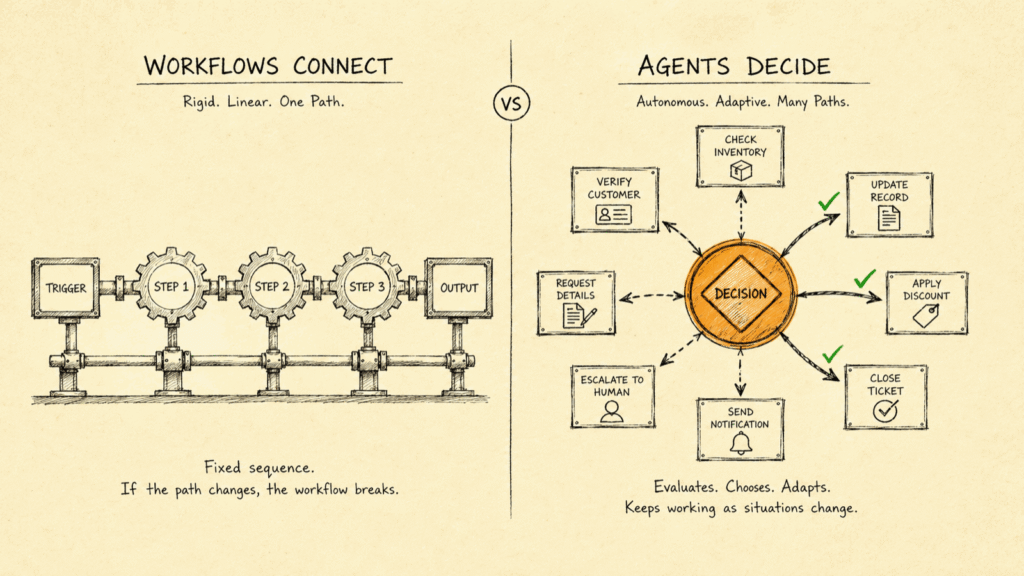
KORIX defines the difference simply: a workflow automates a path you already know; an agent decides a path you don't. Zapier, Make and n8n are workflow automation tools: you draw the steps in advance (trigger → action → action), and the tool executes that exact sequence every time, reliably and identically. An AI agent is given a goal and the freedom to choose its steps: it reads input that may be messy or unexpected, reasons about it, and decides what to do, which is powerful precisely because it isn't pre-scripted.
That single difference, predetermined execution vs. runtime decision, drives everything else: cost, reliability, and when each is the right tool. It's also why so much enterprise "AI" disappoints. Stanford's 2025 AI Index found that 78% of organizations used AI in 2024. Yet MIT's NANDA initiative found only about 5% of custom AI pilots reach production with real value, a figure echoed in independent analysis of the data. And Gartner expects 30% to 50% of generative-AI projects to be abandoned after proof-of-concept. A meaningful slice of those were agents built where a workflow would have shipped, and we explore the broader pattern in why AI projects fail.
What Zapier, Make and n8n are great at
Workflow tools are excellent for the right job. Zapier is the most polished and beginner-friendly, with thousands of app integrations. Make (formerly Integromat) offers more visual, branching control at lower cost. n8n is open-source and self-hostable, which appeals to teams that want data to stay in their own environment and to avoid per-task pricing.
All three shine when the work is deterministic: move a new lead from a form into your CRM and Slack; sync invoices between two systems; send a templated follow-up on a schedule. The steps are known, the same input should always produce the same output, and you want it cheap and bulletproof. For that, you do not need (and should not pay for) an AI agent. A workflow tool will do it for a fraction of the cost, with predictability as a feature, not a risk.
What an AI agent is actually for
An agent earns its cost when the task can't be fully scripted. It's the right tool when input is ambiguous (free-text that doesn't fit neat categories), when the right action depends on judgment (which of many responses fits this unusual case?), or when exceptions arrive that no rule anticipated. An agent reads the situation, reasons, and decides, and can handle the long tail of cases a rules engine would choke on. That flexibility is the whole point of our production AI agents, and it's why governed, owned agents are worth building when judgment is central. A concrete example: routing inbound support messages. If every message neatly carried a category, a workflow could route it in one rule. In reality messages are free-text, vague, and often span several issues at once, so deciding where each one should go is a judgment call, and that's where an agent earns its keep. The trade-off is non-determinism: an agent may choose differently on similar inputs, which is a strength for judgment work and a liability for plumbing.
How to tell which one you need: a 30-second test
Before you price an agent, run the task through four questions. They sort almost every case cleanly.
One: can you write the whole rule down? If you can describe the task completely as "when this happens, do exactly that," with no "it depends," it's a workflow. The moment you find yourself writing "it depends on…", you've found the part that might need an agent. Two: should the same input always produce the same output? If yes, you want the determinism of a workflow; an agent's freedom to choose differently is a bug here, not a feature. Three: is the input structured or messy? Clean fields and predictable formats suit a workflow; free-text, edge cases, and exceptions that rules can't anticipate are agent territory. Four: how often do real exceptions occur? If 95% of cases follow the rule and 5% are oddballs, the elegant answer is usually a workflow for the 95% that calls an agent only for the 5%, not an agent for everything.
This mirrors what McKinsey's State of AI research keeps finding: the value comes from redesigning the workflow around the few decisions that actually matter, not from sprinkling AI across steps that were never decisions in the first place. Most teams discover, doing this honestly, that the majority of what they wanted an "AI agent" for is really deterministic plumbing, and that's good news, because plumbing is cheap.
AI agents vs workflow automation: the comparison
Same ambition (less manual work), two different tools. Here's how they line up.
| Zapier / Make / n8n (workflow) | AI agent | |
|---|---|---|
| Core job | Connect apps, run a fixed sequence | Reason and decide under ambiguity |
| Behaviour | Deterministic: same input, same output | Non-deterministic: judgment-based |
| Best input | Structured, predictable | Messy, ambiguous, exception-heavy |
| Cost | Free tier to modest monthly subscription | A custom build ($15K–$40K at KORIX) |
| Reliability | Very high for defined paths | High for judgment; needs governance |
| Use when | You can write the full rule down | You can't; the steps depend on a decision |
Want a Realistic Plan for Your Project?
No sales pitch. We will give you an honest read on what your situation actually needs, what it should cost, and whether AI is even the right tool here.
Book a Discovery Call →They're not rivals: the best designs combine them
This isn't agents-versus-automation as a loyalty test. The strongest systems use both: a workflow tool handles the deterministic plumbing (triggers, moving data, notifications) and calls an agent only for the one step that needs a decision, then takes back control. You match each step to the right tool instead of forcing one philosophy onto the whole system. The expensive mistake is building an agent to run an entire flow when 90% of it is fixed rules a $20-a-month workflow would handle flawlessly. A common shape looks like this: a Zapier or n8n flow catches every inbound email, files the routine ones by rule, and hands only the ambiguous, multi-issue ones to an agent that reads them and decides where they belong, then the workflow takes back over to log, notify, and close. The cheap, reliable rails run 90% of the volume, and the agent is reserved for the judgment that genuinely needs it. Good design is mostly knowing which 10% actually needs to decide.
When you should NOT build an agent, honestly
Say-what-others-won't time, even though we build agents for a living. Don't build an agent if the process is fully rules-based: a workflow tool will be cheaper and more reliable. Don't build one if predictability matters more than flexibility, because non-determinism is the wrong trait for, say, financial postings that must be identical every time. And don't build one if an off-the-shelf workflow tool already solves it: buying a custom build to replace a working $20 zap is a waste we'll talk you out of. We'd rather tell you to use Zapier and keep your budget than sell you an agent you don't need; that honesty is the same standard we bring to when not to adopt AI at all and to choosing how to get AI delivered.
How we decide, in practice
On every engagement we map the flow first and ask, step by step: does this step follow a rule, or make a decision? The rule-steps go to automation; only the decision-steps get an agent. That discipline is why our builds ship. Proteinverse, a 5-star Clutch engagement with Lucky Valecha, combined deterministic automation for the order pipeline (which cut order-to-shipment time from 15–20 minutes to under 90 seconds) with intelligence only where judgment was needed. Numerology Matrix, a 5-star Clutch project for Anna Mazurowska, was a genuine AI application (live by day 18) because the core task actually required decisions, not just connections. The honest question is never "agent or workflow?" in the abstract; it's "which does this step need?" If you want help drawing that line for your own process, the 21-day pilot starts exactly there. Talk to us and we'll tell you straight; sometimes the answer is "just use Zapier."
Workflows connect; agents decide
If the task is a fixed set of rules (when X happens, do Y), a workflow tool like Zapier, Make or n8n is cheaper, faster, and the right answer. You only need an AI agent when the work requires judgment under ambiguity: reading messy input, weighing options, and deciding what to do next. Most 'we need AI' requests are really 'we need automation,' and confusing the two is how budgets get wasted.
AI agents and tools: the full series
This article is part of our AI agents and tools series. The pillar guide covers the whole topic; the others each go deeper on one part.
- Pillar guideWhat is an AI agent?Start here: an agent perceives, decides and acts toward a goal, unlike a chatbot or a fixed automation.
- AI agent vs chatbotChatbots answer questions; agents decide and act inside your systems.
- AI workflow automation tools comparedEight tools compared on real total cost, and where each one breaks.
- AI stacks that reach productionFive stacks that ship, and how to match yours.
- Best no-code AI platformsWhat no-code AI platforms can and cannot do, and when you will outgrow them.
- Best document processing toolsAI document extraction tools compared, and how to pick one for your workflow.
- OpenAI vs open-source modelsHow to choose on cost, control, privacy and performance.
- GPT-6 Astra: enabling it safelyWhat a regulated firm should settle before switching it on.
Continue learning —
go deeper.
What's the difference between an AI agent and Zapier or Make?
Zapier, Make and n8n are workflow automation tools: they connect apps and run a fixed, predefined sequence, so when X happens, do Y, then Z. They execute rules you write; they don't decide. An AI agent reasons over messy or ambiguous input, weighs options, and chooses what to do next without a pre-scripted path. The shorthand: workflows connect; agents decide. Use a workflow when the steps are known and fixed; use an agent when the steps depend on judgment.
Do I need an AI agent or just an automation like Zapier?
If you can write the rule down completely ('when a form is submitted, add the row to the CRM and send this email'), you need a workflow tool, not an agent. It will be cheaper, faster to build, and more reliable. You need an agent only when the task can't be fully scripted: classifying free-text that doesn't fit neat categories, deciding which of many actions fits an unusual case, or handling exceptions that rules can't anticipate. Most requests are the former.
Is Zapier or Make cheaper than building an AI agent?
Almost always, yes, for the work they're suited to. Zapier, Make and n8n run from free tiers to modest monthly subscriptions and need no custom development for standard app-to-app automation. A custom AI agent is a build (KORIX engagements run $15,000 to $40,000) and only earns that cost when judgment and ambiguity are central to the task. Paying for an agent to do deterministic plumbing that a $20/month workflow handles is exactly the kind of mismatch that wastes AI budgets.
Can Zapier and AI agents work together?
Yes, and the best designs often combine them. A workflow tool handles the deterministic plumbing (triggers, moving data between apps, notifications) while an agent is called only for the step that needs a decision, then hands control back to the workflow. You don't have to choose one philosophy for the whole system; you match each step to the right tool. The mistake is using an agent for the whole flow when 90% of it is fixed rules.
When should you NOT build an AI agent?
Don't build an agent when the process is fully rules-based, when reliability and predictability matter more than flexibility, or when an off-the-shelf workflow tool already does the job. Agents introduce non-determinism (they can choose differently on similar inputs), which is a feature for judgment tasks and a liability for plumbing. If you need the same input to always produce the same output, that's a workflow, not an agent.
What is n8n and how is it different from Zapier?
n8n is an open-source workflow automation tool you can self-host, which appeals to teams that want data to stay in their own environment and to avoid per-task pricing. Functionally it sits alongside Zapier and Make as a workflow connector: it executes defined sequences. The agent-vs-workflow distinction applies to all three equally: they connect and execute; they don't reason. n8n's self-hosting is about control and cost, not about whether it 'decides.'