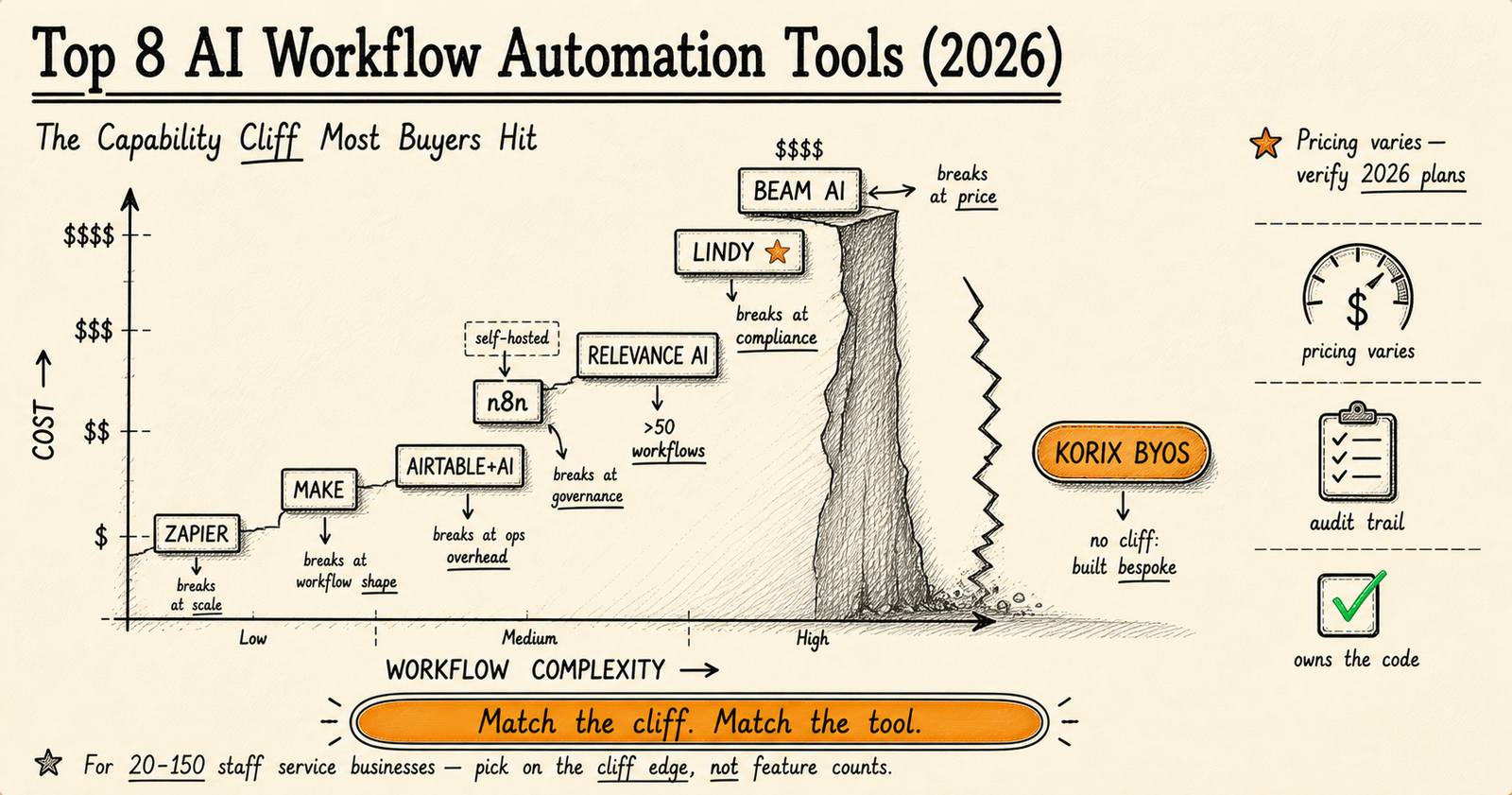
The 8 best AI workflow automation tools in 2026 are Zapier, Make, Airtable, n8n, Relevance AI, Lindy, Beam, and KORIX BYOS. Each breaks at a different point — Zapier on cost, Make on complexity, n8n on governance, Lindy and Beam on audit trails. Pick on feature count and you'll regret it within 12 months. Pick on the cliff edge nearest you and you'll buy 18 months instead of six.
The 8 tools, and where each one breaks:
- Zapier: cost, at ~5,000 monthly runs.
- Make: complex data shapes, around 50 workflows.
- Airtable + AI: ops overhead.
- n8n (self-hosted): governance.
- Relevance AI: compliance and scale.
- Lindy.ai: audit needs.
- Beam AI: price.
- KORIX BYOS: no cliff. Built bespoke into your stack.
The rule: pick on the cliff edge nearest you, not on feature count. That choice buys you 18 months instead of 6.
Before comparing tools, settle the prior question: do you even need one of these, or do you need an AI agent that makes decisions? See AI agents vs Zapier, Make & n8n for where a workflow ends and an agent begins.
I've spent 19 years building software systems, the last several focused specifically on AI implementation for service businesses with 20-150 staff. In that time, I've inherited two retail analytics rebuilds, watched a marketing automation system send hundreds of badly-targeted emails because no one had wired in a rollback, and seen an operations team manually reconcile thousands of documents per month because their AI extraction tool produced data their reporting workflow couldn't ingest.
Every one of those failures started with the same decision: someone picked an automation tool based on a feature comparison page rather than its production failure modes. This article gives you the comparison the vendors don't write — where each tool actually breaks, what that costs you in real money, and when the right answer is to stop renting and start building.
The Capability Cliff: The One Pattern Every Tool Hides
Every AI workflow automation tool on the market in 2026 has a capability cliff. The cliff is the specific operational threshold past which the tool's design assumptions stop holding — the point where its pricing model becomes punitive, its governance gets thin, or its visual builder starts fighting your actual logic.
The cliff is also why MIT NANDA's 2025 State of AI Report puts the production-success rate for AI workflow projects at just 5{be8589ee3b1ba4d663179a4a47f673df393a43c95c73388f0df14e26eae7ebbb} — a number that hasn't moved meaningfully in three years. Atlassian's 2026 State of Product survey backs this up from the operational side: 46{be8589ee3b1ba4d663179a4a47f673df393a43c95c73388f0df14e26eae7ebbb} of teams name integration as the single biggest barrier to scaling AI automation. Both findings point at the same root cause — teams pick tools by feature comparison and discover the cliff six to twelve months later.
Vendor comparison pages obscure this on purpose. Listicles compare features ("8,000+ integrations vs 1,800+ integrations") that don't matter for production decisions. The former Chief Decision Scientist at Google, Cassie Kozyrkov, frames it bluntly: "The bottleneck is not the AI technology. The bottleneck is knowing which problem to give it." The same is true for AI workflow tooling — the bottleneck is matching the tool's design assumptions to your operational reality. The questions that actually predict whether a tool will survive your next 18 months are different:
- What's the cost shape at 10× current volume? Linear, sub-linear, or step-function?
- What happens when a connected SaaS changes its API? Maintained integration, or "it broke, file a ticket"?
- Who owns rollback when an AI agent misfires at 2 AM? The platform, your ops team, or nobody?
- Can a compliance officer trace exactly why an automation made a specific decision six months ago?
Each of those questions has a tool-specific answer. The chart that visualises this — the cost-versus-complexity scatter where each tool sits at a different cliff edge — is the diagnostic I draw on whiteboards with operations leaders before any tool decision. We'll walk through each tool's specific cliff next.
1. Zapier — Breaks at Cost (~5,000 monthly runs)
Best for: Non-technical teams running 5-15 simple workflows with broad SaaS connector needs.
The cliff: Zapier charges per task, where every step inside a Zap counts. A 10-step workflow run 10,000 times produces 100,000 tasks. At standard 2026 pricing, that lands around $208 per month — and the cost shape is purely linear, with no native deduplication or batching that would dampen growth. Cost becomes the dominant constraint somewhere between 5,000 and 25,000 monthly runs depending on workflow length.
What works: Ramp-up speed is unmatched. Their integration catalogue is the largest in the industry — over 8,000 pre-built connectors — and the maintenance is genuinely active. AI features (Agents, MCP support, AI automation steps) shipped in late 2025 are credible.
When to leave: When monthly task count crosses roughly 25,000, or when you have more than three workflows that each fire 5,000+ times per month. The math gets uncomfortable fast.
2. Make — Breaks at Complex Data Shapes (~50 workflows)
Best for: Visual-builder teams running mid-volume operations with non-trivial data transformations.
The cliff: Make becomes cheaper than Zapier at around 750 monthly operations and stays cheaper through mid-volumes. The break point isn't price — it's workflow complexity. Once your scenarios need transforms across nested objects, real conditional branching with multiple outcomes, or shared sub-workflows that other scenarios reuse, Make's visual canvas becomes the bottleneck. You spend more time fighting the layout than shipping logic.
What works: Operations-per-month pricing is more honest than Zapier's task model for medium workflows, and the visual builder is genuinely better than competitors for showing data flow at a glance.
When to leave: When you have more than 50 active scenarios or your workflows require real algorithmic logic. Past that point, you're building software in a visual UI — which is harder than just writing the software.
3. Airtable + AI — Breaks at Ops Overhead
Best for: Teams that already live in Airtable, automating around their existing data rather than across systems.
The cliff: Airtable's automations were designed for in-base workflows, and they're excellent at that. The cliff appears when you start crossing bases or coordinating with external SaaS. Triggers fire silently, error handling is bare-bones, and once you have more than 5-10 cross-base automations the dependency graph becomes harder to debug than the workflows themselves are useful.
What works: AI Cobuilder shipped in late 2025 is genuinely useful for in-base AI logic — summarising records, classifying entries, generating outputs from structured data. If your workflow lives entirely inside Airtable, this is competitive.
When to leave: When you have more than 20 active automations, when you need observability (which automation ran when, what it did, why), or when external SaaS integration becomes the dominant pattern.
4. n8n (Self-Hosted) — Breaks at Governance
Best for: Technical teams running high-volume workflows with engineering ops capacity.
The cliff: n8n self-hosted is the cheapest option at scale, often by a 20× factor. The same 10-step workflow run 10,000 times costs around $208 on Zapier, around $20 on Make, and somewhere between $5-80 on a self-hosted VPS for n8n — depending on instance size. That cost differential makes n8n the obvious answer for high-volume use cases if you have engineering ops capacity.
What breaks: Governance. With self-hosted n8n, you own everything the SaaS platforms own for you — uptime monitoring, backups, security patching, audit trail design, role-based access control, model version pinning. n8n the product won't stop you from building all of that. But you have to build it. The 2025 Stack Overflow Developer Survey shows the trend clearly: 67{be8589ee3b1ba4d663179a4a47f673df393a43c95c73388f0df14e26eae7ebbb} of developers handling automation infrastructure report self-hosting their workflow tools at scale, but the same survey notes that operational overhead is the leading reason teams revert to managed platforms within 18 months. Most teams that move to self-hosted n8n underestimate the ops overhead by a factor of two or three.
When to leave: When you're in a regulated industry that requires audit trails the platform doesn't provide out of the box, or when your engineering team can't fund the ongoing ops cost. The right answer here isn't to leave n8n — it's to add a governance layer your auditors will accept. Often that's where bespoke deployment overtakes the platform entirely.
5. Relevance AI — Breaks at Compliance + Scale
Best for: AI-native operations teams building agent-based workflows.
The cliff: Relevance is genuinely strong on agent orchestration. The break point is dual: compliance (SOC 2 in place; HIPAA, PCI, and GDPR audit-trail support thinner than enterprise buyers want) and pricing at scale (climbs sharply past 50 active agents). For a service business comfortably between SMB and enterprise, this can become an awkward middle.
What works: The agent-builder UX is excellent, and the platform handles tool calls and agent-to-agent handoffs better than most competitors. For prototyping and internal-use agents, Relevance ships faster than almost any other option.
When to leave: When you cross 50+ active agents or any compliance audit starts asking questions Relevance can't directly answer.
6. Lindy.ai — Breaks at Audit Needs
Best for: Sales and customer success teams wanting fast-shipping AI agents.
The cliff: Beautiful product, weak governance. The audit trail isn't really there — you can see what an agent did, but not always why, and certainly not which model version was active when it did it. There's no real rollback semantics, and 18 months in you may not be able to answer the question every regulated industry asks: "show me the decision-trace for this output."
What works: Time-to-first-working-agent is among the fastest in the category. The UX is genuinely the best in the category for non-technical operators.
When to leave: First compliance review. If your industry has any external audit obligation — financial services, healthcare, regulated marketing — Lindy is a prototyping tool, not a production deployment target.
7. Beam AI — Breaks at Price
Best for: Fortune 500 enterprises with budget for white-glove deployment.
The cliff: Strong product, premium pricing model that's wrong for most service businesses. Custom enterprise contracts only — typical six-figure starting point with multi-year commitments. The product solves real enterprise problems but the contract structure prices out everyone below Fortune 500.
What works: If you're a regulated enterprise with a procurement department that can absorb a six-figure annual deployment, Beam ships excellent agent-native infrastructure with proper audit trails and compliance positioning.
When to leave: If you're not Fortune 500, you should leave on Day 1. The pricing isn't going to come down for you.
Want a Realistic Plan for Your Project?
No sales pitch. We will give you an honest read on what your situation actually needs, what it should cost, and whether AI is even the right tool here.
Book a Discovery Call →8. KORIX BYOS — No Cliff (Built Bespoke Into Your Stack)
The eighth option isn't a platform. It's the absence of one.
BYOS (Bring Your Own Stack) is what we deploy at KORIX: AI agents and workflows built directly into your existing software estate — HubSpot, Salesforce, Microsoft 365, Slack, Notion, whatever your team already uses — rather than on top of yet another SaaS platform. You own the code. There's no platform fee. No per-run cost after build. No vendor lock-in. No cliff.
What it costs: A KORIX 21-Day AI Pilot typically lands between $15,000-$40,000 for a single deployed agent or workflow with full ownership transfer. Compare that to five-year cumulative cost on a mid-volume Zapier or Make subscription, plus annual enterprise upgrade pressure, plus the implementation hours every platform demands anyway.
What you get: Code you own, sitting inside your existing stack. Agents auditable from day one because they were built with audit in mind. Production deployment by Day 22 — guaranteed, or you don't pay the second invoice.
When BYOS wins: See the threshold section below. It's not for everyone, and we're explicit about that. Read the full BYOS philosophy here.
The TCO Math (Real Numbers, 2026)
Cost-at-scale is the comparison the vendor pages won't show you. Here's the table for a typical 10-step workflow at three usage tiers:
| Tool | 100 runs/mo | 1,000 runs/mo | 10,000 runs/mo | Cost shape |
|---|---|---|---|---|
| Zapier | Free tier | ~$30 | ~$208 | Linear (per task) |
| Make | Free tier | ~$9 | ~$20 | Sub-linear at volume |
| n8n (Cloud) | ~$20 | ~$20 | ~$50 | Per execution (not per step) |
| n8n (self-hosted) | ~$5 (VPS) | ~$5-20 | ~$20-80 | Infrastructure only + ops time |
| Airtable + AI | $24/seat | $54/seat | Custom | Per-seat + AI credits |
| Relevance AI | ~$19 | ~$199 | Custom enterprise | Step-function past mid-tier |
| Lindy.ai | $39+ | $199+ | Custom | Per-credit + tier upgrades |
| Beam AI | Custom | Custom | Custom (six-figure) | Enterprise contract only |
| KORIX BYOS | $15,000-40,000 one-time build, then $0 platform cost — you own the code | Capex, not opex | ||
Pricing as of May 2026; verify on each vendor's site before committing. The numbers above assume a 10-step workflow at the indicated monthly run count.
The pattern: at low volume, Zapier and Make's free tiers are essentially free. At medium volume, Make and Cloud n8n become the value picks. At high volume, self-hosted n8n's TCO is unbeatable if you have ops capacity — but that's a real "if." Past 10,000 runs and 50 workflows, the cumulative five-year cost for any platform starts approaching the build cost of bespoke deployment. That's where BYOS becomes the rational choice.
The 7-Question Buyer Test (Ask Before You Sign)
Before committing to any AI workflow tool, walk through these seven questions. They're the diagnostic I run with operations leaders before any tool decision. Answer them honestly — the right tool falls out of the answers.
- What's your monthly run volume? Below 500: any free tier works. 500-5,000: Make is the sweet spot. 5,000-50,000: n8n (cloud or self-hosted, depending on ops capacity). 50,000+: bespoke or enterprise.
- What connects to what? Pure-SaaS chains favour Zapier. Database-centric work favours Airtable or Make. Multi-system orchestration with custom logic favours n8n or bespoke. Inventory which integrations you actually need — not the catalogue size.
- Is the data sensitive? If your workflow touches PHI, financial records, or any regulated data, the tools without audit trails (Lindy, basic Make) are out from Day 1. Don't paper over this.
- Who owns the workflow when it breaks? If the answer is "the platform," you need SaaS support contracts. If "our ops team," you need observability tools. If "nobody," you have a problem regardless of which tool you pick.
- How fast must it run? Real-time (sub-second response): bespoke or specialised. Near-real-time (under 60 seconds): most platforms. Batch (hourly/daily): the cheapest option wins.
- What's the total cost at your projected scale? Calculate at 12 months and 36 months — not just the trial-month price. The cost shape (linear, sub-linear, step-function) matters more than the starting price.
- Who owns the workflow code? If you stop paying the platform, do your automations come with you or evaporate? This is the question that gets ignored most often. The answer changes the entire conversation.
If your answers cluster around a single tool — pick that tool. If they're scattered across multiple tools, you're either at the cliff edge of one tool or you're a candidate for bespoke deployment. Which brings us to the threshold question.
When to Stop Shopping for Tools and Build Your Own
There's a specific threshold past which the math flips: licensing a workflow platform costs more over five years than building bespoke automation directly into your existing stack. The threshold has three triggers, and crossing any one of them is enough.
Trigger 1 — Volume: 5,000+ monthly workflow runs. At this volume, platform fees become a meaningful operational line item. The five-year cumulative cost of a mid-tier Zapier or Make subscription approaches the one-time build cost of bespoke deployment.
Trigger 2 — Workflow count: 50+ active workflows. Past this point, the platform's governance can't keep up — every compliance review surfaces the same gaps, and the cost of bolting governance onto a platform that wasn't designed for it exceeds the cost of building governance-first from the start.
Trigger 3 — Compliance: Any regulated audit. SOC 2, HIPAA, PCI-DSS, GDPR with audit-trail requirements — the moment a compliance officer enters the conversation, most no-code platforms become risk vectors rather than risk reducers. Governed AI isn't an extra layer you add to a platform; it's a design choice you make on Day 1, and bespoke deployment lets you make it.
BCG's 2026 AI Value Capture research on enterprise AI adoption found that organisations capturing the most value from AI are not the ones with the most sophisticated models — they are the ones with the clearest process definitions and the tightest feedback loops between AI output and human review. Translated to workflow tooling: the firms that win past the threshold aren't the ones with the most platform features, they're the ones who designed governance into the system from the start. Platforms make that hard. Bespoke makes it the default.
A different angle from Deloitte's 2026 State of Generative AI in the Enterprise: the survey found organisations that piloted AI on a specific, bounded workflow before broader rollout had significantly higher rates of successful scaled adoption — and the firms that scaled successfully were also the firms most likely to have moved away from generic platforms toward purpose-built integration. Both data points reinforce the same recommendation: a 21-day bounded pilot is the lowest-risk way to validate both the use case and the tooling architecture.
Andrew Ng, who has shipped more production AI than almost anyone alive, has been making this point publicly for years: the gap between "AI works in a notebook" and "AI works in production" is roughly 100× the engineering effort, and almost all of that effort is glue code, governance, and integration — the exact things vendor demos hide. His framing applies directly to workflow automation tooling: the platforms that demo well are not always the platforms that deploy well, and the ones that deploy well in regulated industries are almost never the ones that demoed best.
If you cross any one of {volume > 5K runs/month, workflow count > 50 active flows, compliance audit pending}, the rational decision is to stop renting a platform and build your own stack. If you cross two of the three, you're already past the threshold — you just haven't done the math yet.
Three Real Failure Modes I've Seen
Pattern recognition from 19 years of inheriting and rebuilding AI projects. The names are disguised; the lessons are exact.
Failure 1: The marketing automation that couldn't roll back
A B2B services company had wired their AI lead-scoring model directly into outbound email automation through one of the no-code platforms. The model had been live for six weeks when it misclassified a batch of prospects — over-scoring them as warm leads — and the automation fired hundreds of inappropriate outreach emails over the course of a few hours. The platform had no rollback semantics for the agent's decisions and no audit trail granular enough to identify which specific model version had produced which output. The team ended up manually shutting down the entire automation and apologising to a list of prospects they'd burned. The fix was rebuilding the system with proper governance — including pinned model versions and a mandatory review checkpoint before any external action — but that work cost roughly twice what designing it correctly from the start would have cost.
Lesson: Speed-to-deploy without rollback isn't speed. It's debt that compounds the moment something goes wrong.
Failure 2: The platform that demoed beautifully and broke in production
A retail analytics rebuild I inherited a couple of years ago. The previous vendor had spent eight months on an AI platform building prediction models that looked excellent in demos. In production, the predictions were useless — because the models had never been connected to the client's actual inventory system. The data pipeline didn't exist. The platform was perfectly capable of supporting the integration, but supporting it and shipping it are different things, and "we'll connect that in phase 2" had quietly turned into "phase 2 isn't funded." The rebuild cost the client roughly three times what the original project should have cost if it had been designed as a deployment from the start.
Lesson: If your AI tool produces a strategy deck, an optimised prediction model, and a beautiful dashboard — but doesn't ship a working integration into the system that drives actual business decisions — you bought a strategy deck.
Failure 3: The document extraction that scaled into chaos
An operations-heavy services client manually processed several thousand documents per month. Multiple staff. Frequent data-entry errors compounding into reporting inaccuracies. They had tried two different no-code AI extraction tools before we got involved. Both had handled the basic extraction fine — but neither could structure the output in a way that fed cleanly into the client's downstream reporting workflow without extensive manual reformatting. The "automation" was producing data their actual systems couldn't ingest, which meant staff still had to touch every extraction manually to clean and reroute it. Net time savings: marginal. The bespoke rebuild wired extraction directly into the reporting pipeline, with structured outputs designed to match the downstream schema. Manual processing time dropped meaningfully and accuracy improved on its own.
Lesson: Workflow automation isn't extraction quality. It's whether the extraction output flows into the rest of your operation without a human reformatting it. Tools that don't model your downstream systems produce work, not automation.
The honest recommendation
Where this comparison stops being useful. If you are still weighing these eight against each other, you are probably over-weighting a decision that rarely decides anything. For most service-business workflows any of the top three will do the job, and the trade-off that actually bites is not the platform. It is who maintains the automations after the person who built them moves on. We have inherited more broken automation estates than we have built from scratch, and in nearly every case the tool was fine. If nobody owns your automations six months from now, the tool you pick is not the right fit for the problem you actually have.
If you're at the start of an AI workflow journey and running fewer than 500 monthly runs across simple workflows, start with Zapier or Make. Don't overthink it. The capability cliff is far away, the platforms work as advertised, and you'll learn what your real workflow needs are by running them.
If you're at 500-5,000 monthly runs, Make is probably the value pick — particularly if your workflows have any non-trivial data shape. n8n cloud is the runner-up if you want a simpler pricing model.
If you're past 5,000 monthly runs, or you have more than 50 active workflows, or any regulated audit is on the horizon — stop shopping for tools and have the bespoke conversation. The cost flips, the ownership question gets easier, and the governance you actually need stops being a feature you have to negotiate. Read the BYOS philosophy for the longer treatment of why service businesses past that threshold systematically benefit from the bespoke path. Or see how the 21-Day Pilot works for the operational side.
For the cost-decision angle specifically, our breakdown of what custom AI actually costs in 2026 walks through the £10K-£250K+ ranges by build complexity. For the failure-mode angle, five reasons most AI pilots fail covers the operational patterns this article touches on.
Either way: the right answer is rarely the platform with the most integrations or the cleanest UX. It's the one whose cliff you're least likely to hit. KORIX defines the capability cliff as the operational threshold at which a workflow tool's pricing model, governance design, or visual builder stops matching the team's actual production reality — and the test that matters is not which tool has the most features, but which tool's cliff is furthest from where you operate today.
Most workflow tools work fine until you hit the capability cliff. Choose on where each one breaks — not on feature lists.
Zapier breaks at cost around 5,000 runs/month. Make breaks at workflow complexity around 50 active flows. n8n self-hosted breaks at governance the moment a compliance officer enters the room. Lindy and Beam break on audit trails. The right answer for a 20-150 staff service business depends on which cliff you're closest to — and at a certain scale, the answer is to stop shopping for platforms and build your own bespoke stack instead. The TCO and ownership math both flip past that threshold.
AI agents and tools: the full series
This article is part of our AI agents and tools series. The pillar guide covers the whole topic; the others each go deeper on one part.
- Pillar guideWhat is an AI agent?Start here: an agent perceives, decides and acts toward a goal, unlike a chatbot or a fixed automation.
- AI agent vs chatbotChatbots answer questions; agents decide and act inside your systems.
- AI agents vs Zapier, Make and n8nWhen you need an agent that decides versus a workflow that connects.
- AI stacks that reach productionFive stacks that ship, and how to match yours.
- Best no-code AI platformsWhat no-code AI platforms can and cannot do, and when you will outgrow them.
- Best document processing toolsAI document extraction tools compared, and how to pick one for your workflow.
- OpenAI vs open-source modelsHow to choose on cost, control, privacy and performance.
- GPT-6 Astra: enabling it safelyWhat a regulated firm should settle before switching it on.
Continue learning —
go deeper.
What's the cheapest AI workflow automation tool at scale?
Self-hosted n8n is the cheapest option once you cross roughly 5,000 workflow runs per month. It charges per execution (one workflow run regardless of step count), versus Zapier (per task — every step) and Make (per operation). At 10,000 runs of a 10-step workflow, Zapier costs around $208/month, Make around $20/month, and self-hosted n8n is whatever your VPS costs ($5-80/month). The catch: with self-hosted n8n you own all the operational responsibility — uptime, backups, security patches, governance — that the SaaS platforms handle for you. Cheapest by spreadsheet isn't always cheapest by total cost.
Is Zapier or Make better for non-technical teams?
Zapier wins on ramp-up speed and integration breadth (8,000+ pre-built connectors). Make wins on complex data transformations and visual workflow design — its scenario builder handles nested data structures and branching logic better. For a non-technical team running 5-15 simple two-step workflows, Zapier ships faster. For 15+ workflows with conditional logic or data reshaping, Make produces cleaner architecture. The crossover point is roughly 750 monthly operations: above that, Make becomes cheaper; below that, Zapier's UX is worth its premium.
When should I build my own AI workflow stack instead of using a platform?
Three triggers: (1) you cross 5,000 monthly workflow runs and platform fees become a meaningful line item; (2) you hit 50+ active workflows and the platform's governance can't keep up — every compliance review surfaces the same gaps; (3) a regulated audit (SOC 2, HIPAA, PCI, GDPR with audit trail) starts asking questions the platform can't answer. Past any one of those thresholds, the math flips: build cost becomes lower than five-year cumulative platform cost, and you stop renting access to your own automations.
Are AI agent platforms like Lindy and Beam ready for production?
For prototyping and internal-use agents — yes, both are excellent and ship fast. For customer-facing or regulated production — not quite. Lindy has elegant UX but lacks production-grade audit trails, model version pinning, and rollback semantics. Beam is more enterprise-ready but priced for Fortune 500 contracts (typically six-figure starting point). For a service business between those two extremes, the gap is real: you need governance Lindy doesn't ship and pricing Beam doesn't offer. That's the gap bespoke deployment fills.
What's the biggest mistake teams make when picking an AI workflow tool?
Picking on integration count instead of operational ownership. Every platform claims thousands of integrations — Zapier 8,000+, Make 1,800+, n8n 600+ native nodes. The number is meaningless. The questions that matter: which integrations does the platform actively maintain (not just list)? What's the failure rate when a connected SaaS changes its API? Who owns rollback when an automation misfires? Who can audit why an AI agent made a specific decision? Every team I've seen regret a tool choice in the last five years made the same mistake — they picked on the marketing comparison page, not the production failure modes.