
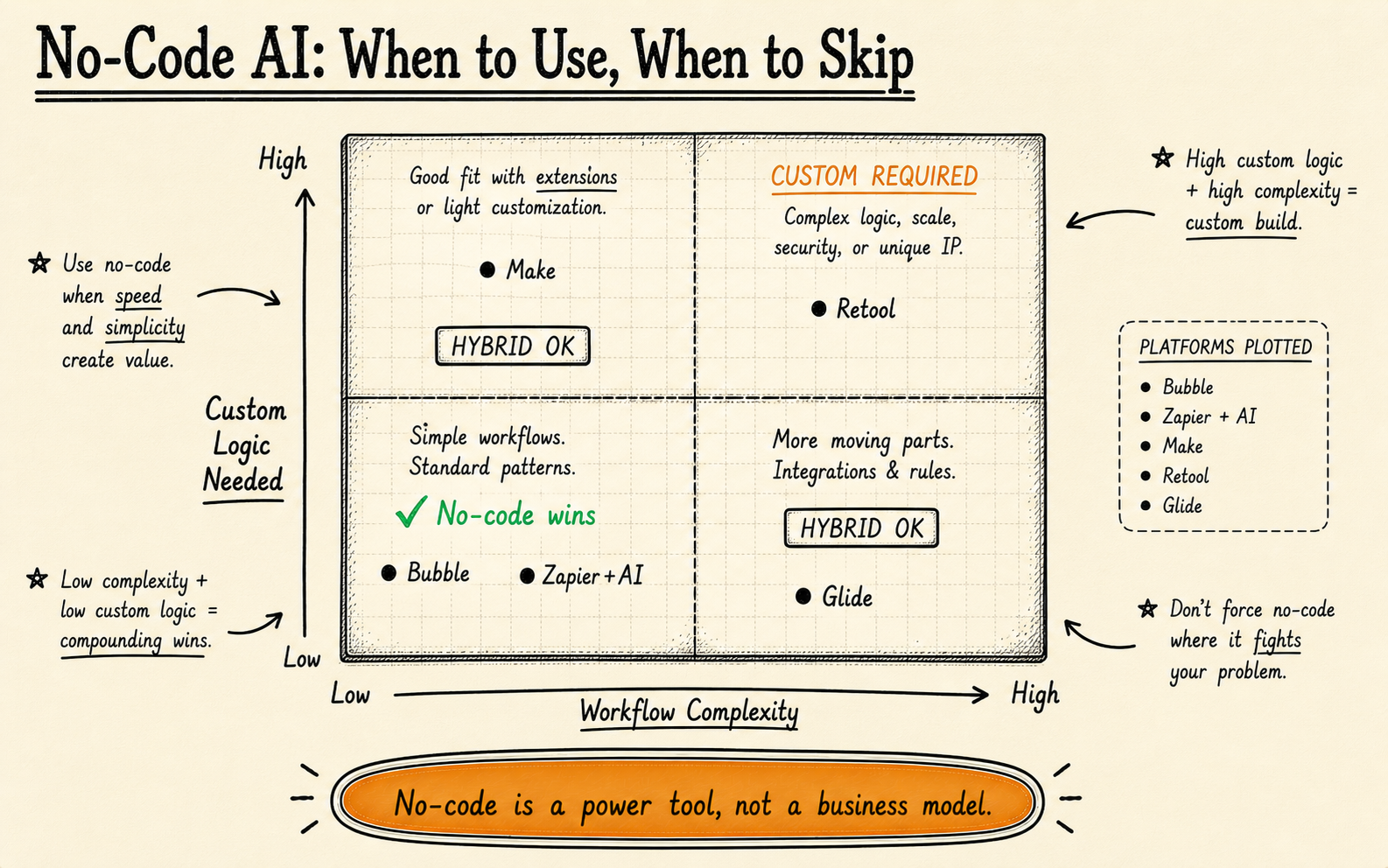
What are the best no-code AI platforms in 2026? The top platforms are Bubble (best for AI web apps), Make.com (best for workflow automation), Google Vertex AI AutoML (best for enterprise ML), Obviously AI (best for predictions), and Akkio (best for analytics). But no-code has real limits — and this guide shows you exactly when you’ll outgrow them.
A Note About Our Bias
We build custom AI software for a living. We could tell you that no-code never works, that every business needs custom development, and that these platforms are toys. That would be dishonest.
The reality: no-code AI tools have gotten genuinely remarkable. For many businesses — especially those testing an idea, running lean, or solving well-defined problems — they’re the right starting point. Sometimes they’re the right long-term solution too.
Custom development makes sense only when these tools can’t do what you need. We’d rather you start with a £0/month free tier, prove the concept works, and come to us later if you outgrow it. That’s better business for everyone.
We’ve recommended no-code platforms to prospective clients who came to us asking for custom builds. If the tool solves the problem, spending £50k on development doesn’t make you smarter — it makes you poorer.
The Best No-Code AI Platforms
1. Bubble — Best for Building AI-Powered Web Applications
Bubble has evolved from a general-purpose web app builder into a credible platform for AI-powered applications. Their API connector and plugin ecosystem now make it straightforward to integrate OpenAI, Anthropic, and other model providers directly into full-stack web applications — with drag-and-drop interface building on top.
What it does best: Full web application development with native AI integration. You can build a customer-facing SaaS product, complete with user authentication, databases, payment processing, and AI features — without writing a line of code. The visual workflow editor handles conditional logic, API calls, and data transformations.
Pricing: Free tier available. Paid plans start at $29/month (Starter), $119/month (Growth), and $349/month (Team). API costs for AI integrations are additional — you pay OpenAI or whichever provider directly.
Best for: Founders building AI-powered MVPs. Internal tools with AI features. Customer portals that need natural language search or chat. Any project where the AI is a feature within a larger web application, not the entire product.
High-performance applications needing sub-100ms responses. Anything requiring complex ML pipelines or model training. Apps with more than ~5,000 concurrent users (you’ll hit performance walls). Custom AI model deployment — Bubble calls external APIs, it doesn’t host models.
Our take: Bubble is the best option for building a complete AI product without code. The learning curve is real — expect 2–4 weeks to become productive — but what you can build is genuinely impressive. The limitation is performance and control: once your app needs speed or custom model behaviour, you’ll need to migrate off. We’ve seen several clients come to us after their Bubble app succeeded and outgrew the platform — which is actually the ideal path.
2. Make.com (formerly Integromat) — Best for AI Workflow Automation
Make.com is where AI meets operational workflows. It connects to over 1,800 apps and services, and its AI modules let you add GPT-powered text generation, image analysis, document processing, and classification into any automated workflow — triggered by events across your entire tool stack.
What it does best: Multi-step AI automations that connect your existing tools. Think: a new email arrives, Make extracts key information using AI, classifies it, updates your CRM, drafts a response, and routes it for approval. The visual scenario builder makes complex branching logic accessible to non-developers.
Pricing: Free tier with 1,000 operations/month. Core plan at $10.59/month (10,000 ops). Pro at $18.82/month (10,000 ops with advanced features). Teams at $34.12/month. Enterprise pricing on request. AI operations consume additional credits.
Best for: Operations teams automating repetitive AI tasks. Businesses connecting AI to existing SaaS tools (Salesforce, HubSpot, Slack, Google Workspace). Document processing workflows. Email triage and classification. Any scenario where AI needs to sit between multiple systems.
Real-time applications (Make runs on triggers and schedules, not live requests). Scenarios requiring complex data transformations or custom model inference. Workflows exceeding 100,000+ operations daily — costs scale linearly and can exceed custom development. Any use case requiring sub-second response times.
Our take: Make.com is probably the single most useful no-code AI tool for established businesses. It doesn’t build AI products — it makes AI operational. If your goal is “automate X process using AI,” start here. The scenario builder is more powerful than Zapier’s for complex logic, and the pricing is more forgiving at scale. The main risk is building workflows so complex that they become unmaintainable — at that point, a proper codebase is actually easier to manage.
3. Google Vertex AI AutoML — Best for Enterprise ML Without Code
Vertex AI AutoML sits in a different category from the other tools on this list. It’s not a workflow builder or app platform — it’s Google’s managed machine learning service that lets you train custom models on your own data without writing ML code. You upload labelled datasets, AutoML trains and evaluates models, and you deploy them as API endpoints.
What it does best: Training custom classification, object detection, entity extraction, and sentiment models on your proprietary data. If you have 1,000+ labelled examples of something (support tickets categorised by urgency, product images tagged by defect type, documents classified by type), AutoML can build a production-quality model.
Pricing: Pay-as-you-go. Training costs vary by data type: ~$3.15/hour for text models, ~$3.46/hour for image models. Prediction costs run ~$1.50–$6 per 1,000 predictions depending on model type. A typical text classification model costs $50–$200 to train. Google Cloud free tier gives you $300 in credits to start.
Best for: Enterprises with labelled datasets who need custom models (not general-purpose GPT). Quality control in manufacturing (image classification). Document categorisation for legal or financial services. Sentiment analysis tuned to your industry’s language. Any task where accuracy on your specific domain matters more than generality.
Businesses without clean, labelled training data (you need at least 500–1,000 examples). Generative AI use cases — AutoML trains discriminative models, not text generators. Small teams without any GCP experience — the Google Cloud console is not intuitive. Rapid prototyping — model training takes hours, not seconds.
Our take: Vertex AI AutoML is underrated. Everyone is chasing generative AI, but many business problems are classification problems — and a custom-trained classifier on your data will outperform GPT-4o at those specific tasks while being faster and cheaper at inference. The barrier is data preparation: if you don’t have labelled datasets, you have to create them first. We’ve helped clients prepare data and train AutoML models as a midpoint between “no-code” and “fully custom” — it works well for the right problems.
4. Obviously AI — Best for Predictive Analytics
Obviously AI specialises in one thing: turning your tabular data into predictions. Upload a CSV or connect a data source, pick the column you want to predict, and Obviously AI builds, trains, and deploys a machine learning model in minutes. No feature engineering, no hyperparameter tuning, no ML knowledge required.
What it does best: Predictive modelling on structured data. Customer churn prediction, sales forecasting, lead scoring, demand planning, pricing optimisation — any scenario where you have historical data and want to predict future outcomes. The platform auto-selects algorithms, handles feature importance, and provides explainability dashboards.
Pricing: Plans start at approximately $75/month (Basic) with limited predictions. Growth plans run $200–$500/month depending on volume and data size. Enterprise pricing on request. Free trial available with limited dataset sizes.
Best for: Sales and marketing teams wanting lead scoring or churn prediction. Operations teams forecasting demand or inventory. Finance teams building revenue models. Any business with 6+ months of historical data in spreadsheets or databases who wants actionable predictions.
Unstructured data (text, images, audio). Real-time predictions at high volume. Complex multi-table relational data without preprocessing. Use cases requiring custom model architectures or deep learning. Datasets under 1,000 rows — predictions won’t be reliable.
Our take: Obviously AI does one thing and does it well. If your question is “can we predict X from our historical data?” and your data is in spreadsheets, start here. The predictions are surprisingly good for standard tabular problems. The limitation is that real-world data is messy — you’ll often need data cleaning and feature engineering that Obviously AI can’t handle, which is where you’ll need either a data engineer or a custom solution.
5. Akkio — Best for Business Analytics AI
Akkio bridges the gap between traditional business intelligence and AI. It combines predictive modelling (similar to Obviously AI) with generative AI for data exploration — you can ask questions about your data in natural language and get charts, insights, and predictions back. It’s positioned as “AI for the business team, not the data team.”
What it does best: Making business data accessible through AI. Connect your CRM, marketing platform, or database, and Akkio lets anyone on your team ask questions, generate reports, build predictive models, and create dashboards — all through a conversational interface. The chat-with-your-data feature is genuinely useful for non-technical stakeholders.
Pricing: Starter at $49/month (limited data and users). Professional at $99/month. Business at $499/month with advanced features and higher limits. Free trial available. White-label options available for agencies.
Best for: Marketing agencies managing multiple client datasets. Business teams that want to explore data without learning SQL. Companies wanting both predictive analytics and natural-language reporting. Small businesses that can’t justify a full BI platform like Tableau or Looker.
Complex enterprise data warehouses with intricate table relationships. Mission-critical predictions where model explainability and auditability are required. Datasets exceeding 10 million rows. Situations where you need full control over model selection and training parameters.
Our take: Akkio is the most approachable tool on this list. If your team is asking “can we do something with AI?” and they have data in spreadsheets or a CRM, Akkio is a low-risk starting point. The white-label option also makes it interesting for agencies. It won’t replace a data science team, but for many SMBs, it doesn’t need to.
6. Relevance AI — Best for AI Agent Workflows
Relevance AI focuses on building and deploying AI agents — autonomous systems that can perform multi-step tasks, use tools, and make decisions. It’s a step beyond simple API calls: you define an agent’s goals, give it access to tools (search, APIs, databases), and it figures out how to accomplish the task.
What it does best: Building AI agents that perform complex, multi-step workflows. A Relevance AI agent can research a topic, synthesise information from multiple sources, make decisions based on criteria you define, and execute actions — all autonomously. The platform provides pre-built tool integrations and a visual agent builder.
Pricing: Free tier with limited agent runs. Team plan at approximately $199/month. Business plan at $599/month with higher volumes and advanced features. Enterprise pricing on request. LLM costs (OpenAI, Anthropic) are additional.
Best for: Businesses wanting to automate research-heavy tasks. Sales teams needing AI-powered prospect research. Support teams building intelligent triage agents. Content teams automating research and analysis. Any scenario where the AI needs to make decisions and take multiple steps, not just answer a question.
Simple, single-step automations (Make.com or Zapier are cheaper and simpler). Tasks requiring 100% accuracy — agents make mistakes and need monitoring. High-volume transaction processing. Use cases where you need full auditability of every decision the AI makes. Companies not comfortable with AI operating semi-autonomously.
Our take: Relevance AI is the most forward-looking platform on this list. AI agents are where the industry is heading, and Relevance lets you experiment without building infrastructure. The caveat: agents are unpredictable. They’ll do unexpected things, take wrong turns, and occasionally produce nonsense. For internal workflows with human oversight, this is fine. For customer-facing applications, you need guardrails that Relevance doesn’t fully provide yet — and that’s where custom development becomes necessary.
7. Zapier + AI — Best for Simple AI in Existing Workflows
Zapier needs no introduction — it connects 6,000+ apps. Their AI additions (AI by Zapier, ChatGPT integration, and AI-powered formatting) let you add AI steps to any Zap. It’s not the most powerful AI platform, but it’s the one your team probably already uses.
What it does best: Adding AI to workflows you’ve already built. If you use Zapier to automate business processes, you can now add AI steps — summarise an email, extract data from text, generate a draft response, classify a support ticket — without switching to a different platform. The learning curve is nearly zero if you already know Zapier.
Pricing: Free tier with 100 tasks/month. Starter at $29.99/month (750 tasks). Professional at $73.50/month (2,000 tasks). Team at $103.50/month. Enterprise available. AI actions consume tasks like any other step.
Best for: Teams already using Zapier who want to add AI to existing automations. Simple AI tasks: summarisation, extraction, classification, drafting. Businesses that want to dip a toe into AI without learning a new platform. Quick wins like auto-categorising form submissions or generating meeting summaries.
Complex AI workflows with branching logic (Make.com handles this better). High-volume use cases — Zapier’s per-task pricing gets expensive fast. Any scenario requiring model fine-tuning or custom models. Multi-step AI reasoning or agent-like behaviour. Applications where AI is the core product, not an add-on feature.
Our take: Zapier + AI is the starting point, not the destination. If your team has never used AI in their workflows, adding an AI step to an existing Zap is the fastest way to demonstrate value. But you’ll outgrow it quickly if AI becomes a significant part of your operations. Think of Zapier as the gateway — once you prove the concept, you’ll likely move to Make.com for more complex automations, or to a custom solution for production-grade AI.
Comparison Table
| Platform | Best For | Starting Price | AI Capabilities | Learning Curve | Key Limitation |
|---|---|---|---|---|---|
| Bubble | AI web apps | $29/mo | API integrations with any LLM | Steep (2–4 weeks) | Performance ceiling |
| Make.com | AI workflow automation | $10.59/mo | AI modules + API connector | Moderate (1–2 weeks) | Not real-time |
| Vertex AI AutoML | Custom ML models | Pay-as-you-go (~$50 first model) | Train custom classifiers, detectors | Steep (GCP knowledge needed) | Needs labelled data |
| Obviously AI | Predictive analytics | ~$75/mo | Auto-ML on tabular data | Low (hours) | Structured data only |
| Akkio | Business analytics | $49/mo | Predictions + chat with data | Low (hours) | Limited scale |
| Relevance AI | AI agent workflows | Free tier / ~$199/mo | Autonomous multi-step agents | Moderate (1–2 weeks) | Agent unpredictability |
| Zapier + AI | Simple AI automations | $29.99/mo | AI steps in existing Zaps | Low (minutes) | Per-task pricing at scale |
Not Sure If No-Code or Custom Is Right?
We’ll give you an honest recommendation — even if it means telling you not to hire us.
Book a Free 30-Min Consultation →When No-Code AI Isn’t Enough
No-code tools are genuinely excellent for a wide range of use cases. But there are specific scenarios where they consistently fall short. If your requirements include any of the following, you’ll likely need custom development — either from the start or eventually.
Data Privacy and On-Premise Requirements
Most no-code AI platforms process your data on their servers (or their AI provider’s servers). If your industry requires that sensitive data never leaves your infrastructure — healthcare patient records, financial transaction data, legal documents — you need models running on your own infrastructure. No-code platforms can’t provide this.
Complex Multi-Model Pipelines
Real-world AI applications often require chaining multiple models: an OCR model extracts text, a classification model routes it, a generative model drafts a response, and a safety model checks the output. No-code tools can handle simple chains, but pipelines with conditional logic, fallbacks, and error handling across 4–5 models require orchestration that visual builders can’t manage cleanly.
Regulatory Compliance (HIPAA, FCA, SOC 2)
Regulated industries need audit trails, access controls, data retention policies, and provable compliance. No-code platforms rarely offer the granular logging and controls that regulators require. If an auditor asks “show me every AI decision made on patient data in the last 90 days, with inputs and outputs,” no-code tools won’t have that answer.
Performance at Scale (>10,000 Requests/Day)
No-code platforms charge per operation, per task, or per prediction. At low volume, this is cheap. At 10,000+ requests per day, the maths shifts dramatically. A custom deployment on your own infrastructure often costs 60–80% less at that scale — and gives you better latency control.
Custom Governance and Human-in-the-Loop
When AI decisions carry real consequences — approving a loan, flagging a transaction, recommending a medical action — you need custom approval workflows, confidence thresholds, and escalation paths. These governance layers rarely exist in no-code platforms, and bolting them on creates fragile systems.
Integration with Legacy Systems
If your data lives in on-premise databases, proprietary ERPs, or systems with non-standard APIs, no-code platforms may lack the connectors. Custom integration work is often the first thing that pushes businesses from no-code to custom development.
The Smart Migration Path
Here’s the approach we recommend to almost every business exploring AI for the first time:
Pick the right platform from this list. Build a working prototype. Prove that AI actually solves the problem and delivers ROI. This takes weeks, not months, and costs hundreds, not thousands. If the concept fails, you’ve lost very little.
Run your no-code solution in production. Pay attention to where it breaks: performance limits, accuracy gaps, features you can’t build, costs that scale badly. Document these constraints — they become the requirements spec for a custom solution.
When you outgrow no-code, you migrate with clarity. You know exactly what the AI needs to do (because you’ve been running it), you have performance baselines to beat, and your data and learnings transfer to the custom build. This is cheaper and faster than starting with custom — because you’ve eliminated the guesswork.
This path isn’t slower — it’s smarter. Companies that jump straight to custom development often spend 3–6 months building something before discovering the AI doesn’t actually solve the problem they thought it would. Starting with no-code eliminates that risk.
Start with no-code. Migrate when you outgrow it.
No-code AI platforms are genuinely good for validation, simple automations, and well-defined problems. Custom development makes sense when you hit data privacy walls, scale limits, compliance requirements, or need multi-model orchestration. The smartest path is to start cheap, prove the concept, and invest in custom only when the data tells you to.
AI agents and tools: the full series
This article is part of our AI agents and tools series. The pillar guide covers the whole topic; the others each go deeper on one part.
- Pillar guideWhat is an AI agent?Start here: an agent perceives, decides and acts toward a goal, unlike a chatbot or a fixed automation.
- AI agent vs chatbotChatbots answer questions; agents decide and act inside your systems.
- AI agents vs Zapier, Make and n8nWhen you need an agent that decides versus a workflow that connects.
- AI workflow automation tools comparedEight tools compared on real total cost, and where each one breaks.
- AI stacks that reach productionFive stacks that ship, and how to match yours.
- Best document processing toolsAI document extraction tools compared, and how to pick one for your workflow.
- OpenAI vs open-source modelsHow to choose on cost, control, privacy and performance.
- GPT-6 Astra: enabling it safelyWhat a regulated firm should settle before switching it on.
Recommended Reading
Which no-code AI platform should I start with?
It depends on your use case. For workflow automation, start with Make.com. For building an AI web app, try Bubble. For predictions from spreadsheet data, try Obviously AI or Akkio. For AI agents, try Relevance AI. See the comparison table above.
Is no-code AI good enough for production?
Yes, for many use cases. No-code handles workflow automation, simple predictions, and AI-enhanced apps well. It falls short for high-volume production (>10K requests/day), strict compliance, complex multi-model pipelines, and data-sensitive industries.
When should I switch from no-code to custom AI?
When you hit data privacy walls, scale limits (>10K daily requests), compliance requirements, need multi-model orchestration, or need custom governance and human-in-the-loop workflows. Read our cost guide for what custom development involves.
How much do no-code AI platforms cost?
Most offer free tiers. Paid plans range from $10/month (Make.com) to $500+/month (Akkio Business). AI API costs from providers like OpenAI are additional. At high volume, per-operation costs can exceed the cost of custom deployment.
Can KORIX help me choose the right platform?
Yes. We offer free 30-minute consultations where we assess your use case and recommend the right approach — even if that means no-code instead of hiring us. Book a call and we will give you an honest answer.